
User's Manual Part 1




Configuring Network Settings
96 Check Point Safe@Office User Guide
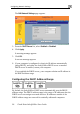
The Edit Network Settings page appears.
3. From the DHCP Server list, select Enabled or Disabled.
4. i
war
5. Cli
A s
6. If y
(usi ), and either the Safe@Office DHCP server or another
, your computer obtains an IP address in
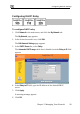
Configuring the DHCP Address Range
Cl ck Apply.
A ning message appears.
ck OK.
uccess message appears
our computer is configured to obtain its IP address automatically
ng DHCP
DHCP server is enabled, restart your computer.
If you enabled the DHCP server
the DHCP address range.
By d ly sets the DHCP
add addresses that the
IP addresses outside of the
DHCP address d computers.
efault, the Safe@Office DHCP server automatical
ress range. The DHCP address range is the range of IP
DHCP server can assign to network devices.
range are reserved for statically addresse