
User's Manual Part 1




Configuring Network Settings
94 Check Point Safe@Office User Guide
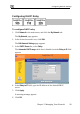
Configuring a DHCP Server
By default, the Safe@Office appliance operates as a DHCP (Dynamic Host
Co g ppliance to
auto heir network
config
nfi uration Protocol) server. This allows the Safe@Office a
matically configure all the devices on your network with t
uration details.
obtain an IP address automatically. If a computer is not co
Note: The DHCP server only serves computers that are configured to
nfigured to
an IP
IP
network, and you want to
u must disable the
Safe@Office DHCP server, since you cannot have two DHCP servers or
relays on the same network segment.
f the
on your network.
obtain an IP address automatically, it is recommended to assign it
address outside of the DHCP address range. If you do assign it an
address within the DHCP address range, the DHCP server will not
assign this IP address to another computer.
If you already have a DHCP server in your internal
use it instead of the Safe@Office DHCP server, yo
If you want to use a DHCP server on the Internet or via a VPN, instead o
Safe@Office DHCP server, you can configure DHCP relay. When in DHCP
relay mode, the Safe@Office appliance relays information from the desired
DHCP server to the devices
Note: When using a Safe@Office 200 series appliance, you can
configure a DHCP server for a DMZ network.
Note: You can perform DHCP reservation using network objects. For
information, see Using Network Objects on page 129.