
Operation Manual




44
Return to contents
5.8.1
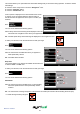
You can choose between the following options:
Yes: The unit emits a conrmation tone each time the screen is
touched.
No: This will turn off the conrmation beep when the screen is
touched.
To make your selection, touch the relevant tick box with your nger.
5.8.2
If you deviate from the calculated route, the Syrius will
automatically recalculate a route without any user intervention.
To indicate rerouting is in progress the Syrius will emit an
audible tone.
You can choose between the following options:
Yes: The re-route tone will be emitted during recalculation.
No: No re-route tone will be emitted.
To make your selection, touch the relevant tick box with your nger.
To save any of the changes press the ‘OK’ button at the bottom of the display.
If you wish to keep the settings unchanged, you can exit the ‘Alert’ menu by pressing the return arrow located in
the bottom right hand corner of the display.
5.9
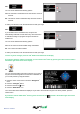
You can check the health of the GPS connection of your unit at
any time as well as being able to see the exact coordinates of
your current position by using this feature.
l Press the centre of the screen to enter the ‘Navigate to’
menu.
l Press the ‘Congure’ button.
l Press the black arrow
once.
l Press the ‘GPS status’ icon.
Your current GPS status will then be displayed. If you wish to revert the GPS engine to the factory default, press the
‘Reset’ button.
If you wish to exit the ‘GPS status’ menu by press the return arrow
located in the bottom right hand corner
of the display.