
Operation Manual




43
Return to contents
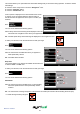
Auto Mute
Yes: The unit will provide an audible alert at your set audible level but will then reduce this alert to a lower level after a few
seconds when you are approaching a safety camera.
No: Syrius will continue to emit a tone at a constant audio level until the camera has been passed.
To make your selection, touch the relevant tick box with your nger.
5.7.4
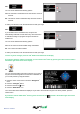
You can choose between the following options:
Yes: Provided you have selected the option to download
schools on the Syrius updater software, this feature
enables the unit to alert you when you are near a primary
school*.
No: The unit will not provide alerts of Primary schools. Schools
are indicated on the Syrius display by the
icon.
*Please note: The Syrius will only provide alerts to Primary Schools at the following specied times:
08:30 – 09:30; 12:00 – 13:00 and 15:30 – 16:30.
To make your selection, touch the relevant tick box with your nger.
To save any of the changes press the ‘OK’ button at the bottom of the display.
If you wish to keep the settings unchanged, you can exit the ‘Camera alert’ menu by pressing the return arrow
located in the bottom right hand corner of the display.
5.8
This function allows you to alter the audible alerts provided during navigation and to turn the audible beeps on or off whilst
selecting functions on the display. By default, both these options are switched ‘ON’. To alter these settings:
l Press the centre of the screen to enter the ‘Navigate to’ menu.
l Press the ‘Congure’ button.
l Press the black arrow
once.
l Press the ‘Alert’ icon.
A list of options is displayed on the left hand side of the screen. To change any of the settings select the relevant option on
the left and a tick will appear next to the option to conrm your selection.