
Operation Manual




42
Return to contents
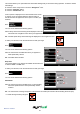
This function allows you to personalise the camera alert settings that you will receive during operation. To alter the camera
alert settings:
l Press the centre of the screen to enter the ‘Navigate to’ menu.
l Press the ‘Congure’ button.
l Press the ‘Camera alert’ icon.
A list of options is displayed on the left hand side of the screen.
To change any of the settings select the relevant option on
the left and a tick will appear next to the option to conrm your
selection.
5.7.1
You can choose between the following options:
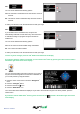
Yes: A safety camera visual warning will be displayed on the left
hand side of the navigation screen as they are approached.
No: No xed speed safety camera warnings are displayed on the navigation screen.
To make your selection, touch the relevant tick box with your nger.
5.7.2
You can choose between the following options:
Yes: The unit will emit an audible alert when you approach a
xed speed safety camera
No: No audible alert is emitted.
Beep Tone
This function allows you to change the audible camera alert tone
to either a ‘Hard’ or a ‘Soft’ tone.
To make your selection, touch the relevant tick box with your nger.
5.7.3
You can choose between the following options:
Smart Mute
Yes: The unit will only emit an audible tone if you are travelling
above the speed limit of the xed speed safety camera
location**.
No: The unit will emit a warning irrespective of the speed of the vehicle (the vehicle must be travelling above 20 mph).
** A visual warning will always be given.
GATSO
30
98
YARD S
GATSO
30
98
YA RDS