
Operation Manual




37
Return to contents
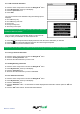
4.5.2Todeletetheofcelocation
l Press the centre of the screen to access the ‘Navigate to’ menu.
l Press ‘My Favourite’ at the top of the display.
l Press the ‘Ofce’icon.
l Press the ‘Delete’ button – an information box will be displayed with ‘Delete home?’ and the options of ‘OK’ and ‘Cancel’.
l Press the ‘OK’ button and the ‘Home’ location will be deleted.
4.6Advanced-SettingyourHomeorOfceaddressusing‘Saveusingcurrentpoint’
It is also possible to create a ‘Home and ‘Ofce’ location using your current coordinates if you are situated at your home or
ofce whilst setting up your unit.
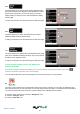
l Press the centre of the screen to access the ‘Navigate to’ menu.
l Press ‘My Favourite’ at the top of the display.
l Press the ‘Home’ or ‘Ofce’icon.
l Press the ‘Change’ button.
l Press ‘Save using Current Point’.
A map will displayed with a road highlighted in red closest to your current position. The name of the road selected will be
displayed at the bottom of the display. If this is not correct, select the correct road with your nger.
l Press ‘Quick Menu’ and
‘Continue’.
l Press ‘OK’
The Syrius will automatically save
this location as your ‘Home’ or ‘Ofce’
destination.
5.0
The ‘Congure’ menu is used to customise the operation and appearance of your unit. To access the ‘Congure’ menu
l Press the centre of the screen to enter the ‘Navigate to’ menu
l Press the ‘Congure’ button at the top of the display.