
Operation Manual






29
Return to contents
3.12.3
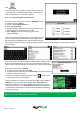
If you do not wish to use the alternative routes offered by the Syrius and you wish to return to the original calculated route,
press the ‘Clear Avoided Road’ button and the original route plotted by the Syrius will be restored.
Once the re-calculation of the original route is complete the summary screen is displayed. Once the calculation is
complete you can either press ‘Go’ to start navigation, ‘Simulation’ to see the actual route that will be taken, ‘Route
Option’ to change the parameters of the route or ‘Guide’ which will list the turn by turn instructions of the journey. The
‘Summary Screen’ will tell you the distance to your destination, estimated time of arrival and the estimated time it will
take to complete your journey.
Please Note: If you have already travelled some of the re-calculated route, the Syrius may produce a slightly
different route from what was originally plotted.
The summary screen is only displayed for approximately 10 seconds before the unit automatically begins to
provide you with turn-by-turn instructions.
If the ‘Avoid by Road’ and ‘Avoid by Range’ have not been used, this feature is unavailable and the button will
be greyed
out.
3.13
After a route has been calculated and the journey has commenced, you can access the summary display again by using
this function.
To view the summary screen:
l Press the centre of the screen to enter the ‘Navigate to’ menu.
l Press the black arrow once.
l Press the ‘Route Description’ icon.
In order to use this function on your Syrius you will need to have entered and calculated a route.
If the ‘Route Description’ icon is greyed out a route has NOT been entered.
From the summary display you can either press ‘Go’ to start navigation, ‘Simulation’ to see the actual route that will be
taken, ‘Route Option’ to change the parameters of the route or ‘Guide’ which will list the turn by turn instructions of the
journey. The ‘Summary Screen’ will tell you the distance to your destination, estimated time of arrival and the estimated
time it will take to complete your journey.
The summary screen is only displayed for approximately 10 seconds before the unit automatically returns to
providing you with turn-by-turn instructions.
3.14
After a multi-route has been calculated and the journey has commenced you can access the multi-route information again
using this summary function.
To view the information of the multi-route:
l Press the centre of the screen to enter the ‘Navigate to’ menu.
l Press the black arrow once.
l Press the ‘Multi-route Description’ icon.
In order to use this function on your Syrius you will need to have entered and calculated a route. If the ‘Route
Description’ icon is greyed out a route has NOT been entered.