
Operation Manual






28
Return to contents
3.12
The Syrius can recalculate your route by avoiding certain roads or redirecting you by distance. This facility only becomes
available once you have calculated a route.
To perform a re-route:
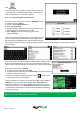
l Press the centre of the screen to enter the ‘Navigate to’ menu.
l Press the black arrow
once.
l Press the ‘Re-Route’ icon.
You can then choose how you would like to re-route your journey from the selections shown on the display.
In order to use this function on your Syrius you will need to have entered and calculated a route.
If the ‘Re-Route’ icon is greyed out a route has NOT been entered.
3.12.1
If you know the road name or road number you wish to avoid, then select this option.
l Press ‘Avoid by Road Name’.
You will be provided with the turn by turn instructions of the route that you are currently following. If the road you are
looking for is not visible, press the down arrow on the right hand side of the display to see further turn by turn instructions.
l Once you have found the road that you wish to avoid, select it with your nger.
Once the calculation is complete you can either press ‘Go’ to start navigation, ‘Simulation’ to see the actual route that
will be taken, ‘Route Option’ to change the parameters of the route or ‘Guide’ which will list the turn by turn instructions
of the journey. The ‘Summary Screen’ will tell you the distance to your destination, estimated time of arrival and the
estimated time it will take to complete your journey.
Please note: The summary screen is only displayed for approximately 10 seconds before the unit automatically
begins to provide you with turn-by-turn instructions.
3.12.2
If you wish to avoid several roads from the selected route calculated by the Syrius, then this function allows you to re-
calculate a route over a user dened distance, ranging from 1 mile up to a maximum of 100 miles.
To use this function:
l Press the ‘Avoid by range’ button - the ‘Select avoided range’ page will be displayed.
l Select the distance of the range you wish to avoid using your nger.
If you wish to view more range distances then press the down arrow on the right hand side of the display. Once you have
selected the range you wish to avoid the Syrius will automatically re-calculate your route.
Once the calculation is complete you can either press ‘Go’ to start navigation, ‘Simulation’ to see the actual route that
will be taken, ‘Route Option’ to change the parameters of the route or ‘Guide’ which will list the turn by turn instructions
of the journey. The ‘Summary Screen’ will tell you the distance to your destination, estimated time of arrival and the
estimated time it will take to complete your journey.
Please note: The summary screen is only displayed for approximately 10 seconds before the unit automatically
begins to provide you with turn-by-turn instructions.