
Operation Manual






27
Return to contents
Once the calculation is complete you can either press ‘Go’ to start navigation,
‘Simulation’ to see the actual route that will be taken, ‘Route Option’ to
change the parameters of the route or ‘Guide’ which will list the turn by turn
instructions of the journey. The ‘Summary Screen’ will tell you the distance to
your destination, estimated time of arrival and the estimated time it will take to
complete your journey.
Please note: The summary screen is only displayed for approximately 10
seconds before the unit automatically begins to provide you with turn-by-
turn instructions.
3.11
This function allows you to select a destination by simply selecting any road on
any area of the map stored within your unit.
To navigate using this facility
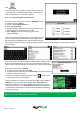
l Press the centre of the screen to access the ‘Navigate to’ menu.
l Press the black arrow
once.
l Press the ‘Find by Map’ icon.
The screen will show a section of the map (usually of your current position with a
road selected in red).
l To see a larger section of the map press the
button to zoom out.
l If you would like to see the map in more detail, use the button to zoom in.
l By pressing and moving your nger on the screen you can move the map
around until you nd your desired location.
l When you can see the required destination, simply press on the road of the map you would like to navigate to and the
road name selected will be displayed at the bottom of the screen.
l Press ‘Quick Menu’ and then press ‘Continue’.
l To start the journey press ‘Calculate’
l To view the location of the POI, press ‘Map’.
l To change the route parameters press ‘Route Option’ (see Route Options on page 35 for specic instructions).
l To return to the previous page press the return arrow located on the bottom right hand corner of the display.
Once the calculation is complete you can either press ‘Go’ to start navigation, ‘Simulation’ to see the actual route that
will be taken, ‘Route Option’ to change the parameters of the route or ‘Guide’ which will list the turn by turn instructions
of the journey. The ‘Summary Screen’ will tell you the distance to your destination, estimated time of arrival and the
estimated time it will take to complete your journey.
Please note: The summary screen is only displayed for approximately 10 seconds before the unit automatically
begins to provide you with turn-by-turn instructions.