
Operation Manual






24
Return to contents
3.9
(Points of Interest)
If you would like to calculate a route to a hotel, airport, restaurant or even a golf course the Syrius can calculate a route
using its extensive database of POI’s (Points of Interest).
To navigate using this database:
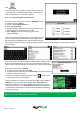
l Press the centre of the screen to access the ‘Navigate to’ menu.
l Press the black arrow
once.
l Press the ‘Find by POI’ icon.
l Press ‘Country’ and select ‘UK’. (If ‘UK’ is already displayed, go
to the next step). Use the arrow keys on the right to scroll up and
down the options.
l Next press ‘City’ and enter the city name using the keyboard
displayed.
As you begin to input the city name, the Syrius will automatically prompt you with a list of possible matches. If you can see
the name of the destination you are searching for in the lower window, you can select it easily by pressing that name with
your nger. If you wish to view the list of possible destinations in full press the down arrow to the top right hand corner of
the display and a list of cities will be displayed then select your destination by touching on it. Use the arrow keys on the
right hand side of the display to scroll through the list.
l Press ‘Category’ and enter the category type using the keyboard
displayed.
If you do not know which category to type you can press the down
arrow to the right of the lower window and all the category types will
be displayed in alphabetical order. Use the arrows to the right of the
display to scroll up and down through the category options. Once you
nd the category you are looking for select it with your nger.
l Press ‘Name’. If the name of your POI is displayed in the lower
window select it with your nger. Alternatively you can start typing
the name to narrow the options and then select it.
All the elds are now lled in for your chosen POI.
l To start the journey press ‘Calculate’
l To view the location of the POI, press ‘Map’.
l To change the route parameters press ‘Route Option’ (see Route
Options on page 35 for specic instructions).
l Press ‘Information’ to see more details about the POI.
l To return to the previous page press the return arrow located
on the bottom right hand corner of the display.
Once the calculation is complete you can either press ‘Go’ to start navigation, ‘Simulation’ to see the actual route that
will be taken, ‘Route Option’ to change the parameters of the route or ‘Guide’ which will list the turn by turn instructions
of the journey. The ‘Summary Screen’ will tell you the distance to your destination, estimated time of arrival and the
estimated time it will take to complete your journey.
Please note: The summary screen is only displayed for approximately 10 seconds before the unit automatically
begins to provide you with turn-by-turn instructions.