
Operation Manual






22
Return to contents
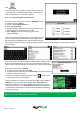
Once you have pressed ‘Go’ the Syrius will now display
your current map position along with a small summary
screen located in the bottom left hand corner. The following
information is displayed on the summary screen:
l Stage 1/4 - indicates this is the rst destination of the
journey
l Distance to rst destination
l Estimated time of arrival to rst destination.
l At the bottom of the screen the following information is
displayed
l Total distance of multi-route journey
l Estimated time of arrival at the end of multi-route journey.
If, during the journey, you wish to cancel the current stage and begin travelling to the next stage in your multi-route journey
press the summary screen in the bottom left hand corner of the display and the message ‘Delete current stage?’ will be
displayed. Press ‘OK’ and the unit will calculate your route to the next stage in the multi-route from your current position.
Note: If the Syrius is turned ‘OFF’ and then ‘ON’ during a multi-route journey the device will retain the current
route and ask you if you wish to continue with the current destination or with the next stage of the destination or
to cancel the multi-route.
3.64 Auto arrange
(Proline Only)
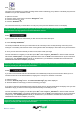
Once you create a multi route the Syrius Proline can ‘arrange’ the multi route in to a logical order by pressing the
icon
Before After
Once the route has been arranged press the icon then press
The Syrius Proline
will now calculate the
multi routes estimated
time and distances
Press to continue or to display the route on a map
Then displays
the route
summary