
Oven Instructions for Installation and Use




Table Of Contents
- 1. INSTRUCTIONS FOR SAFE AND PROPER USE
- 2. INSTALLATION OF THE APPLIANCE
- 3. ADAPTATION TO DIFFERENT TYPES OF GAS
- FINAL OPERATIONS
- 5. DESCRIPTION OF CONTROLS
- USE OF THE COOKING HOB
- 7. USE OF THE OVENS
- 8. AVAILABLE ACCESSORIES
- 9. COOKING HINTS
- 10. CLEANING AND MAINTENANCE
- 11. EXTRAORDINARY MAINTENANCE
- 12. PROBLEMS AND CAUSES
Instructions for the user
14
5. DESCRIPTION OF CONTROLS
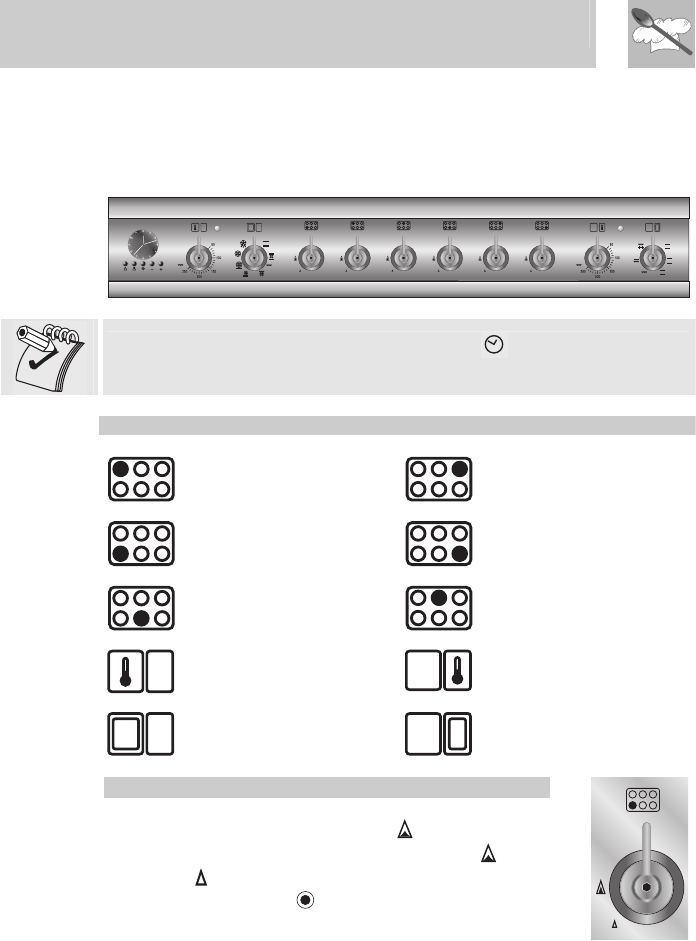
5.1 Front control panel
All the cooker controls and commands are on the front panel.
The user has only to press the central key for 1 - 2 seconds to
enable use of the oven on first use or after a power blackout.
DESCRIPTION OF SYMBOLS
BACK LEFT BURNER
BACK RIGHT BURNER
FRONT LEFT BURNER
FRONT RIGHT BURNER
FRONT CENTRAL
BURNER
BACK CENTRAL
BURNER
MAIN OVEN
THERMOSTAT
AUXILIARY OVEN
THERMOSTAT
MAIN OVEN
FUNCTIONS
AUXILIARY OVEN
FUNCTIONS
COOKING HOB BURNER COMMAND KNOB
The flame is lit by pressing the knob and turning it
anticlockwise to maximum flame . To adjust the
flame turn the knob between maximum ( ) and
minimum ( ). The burner goes out when the knob is
returned to the position .