
SI4548-US-10 Manual


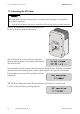
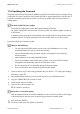
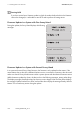
Table Of Contents
- 1 Information on this Manual
- 2 Sunny Island 4548-US/6048-US
- 3 Safety Precautions
- 4 Assembly
- 5 Opening and Closing
- 6 Electrical Connection
- 7 Control Elements
- 8 Initial Start-Up
- 9 Switching On and Off
- 10 Operation
- 11 Archiving Data on an SD Card
- 12 Additional Functions
- 12.1 Load Shedding
- 12.2 Sleep Mode
- 12.3 Time-Controlled Operation
- 12.4 Overload and Short-Circuit Behavior
- 12.5 Mixed Operation with Sunny Island inverters of Different Power
- 12.6 Device Faults and Autostart
- 12.7 Automatic Frequency Synchronization
- 12.8 Time-Controlled Standby
- 12.9 Behavior in the Event of a Failure in a Three-Phase System
- 13 Battery Management
- 14 Connecting External Sources
- 14.1 Generator
- 14.1.1 Parallel Connection
- 14.1.2 Generator Start Options
- 14.1.3 Generator Operation
- 14.1.4 Manual Generator Operation
- 14.1.5 Automatic Generator Operation
- 14.1.6 Limits and Power Control
- 14.1.7 Run Times
- 14.1.8 Operation Together with PV Inverters and Wind Power Inverters
- 14.1.9 Stopping the Generator
- 14.1.10 Stopping the Sunny Island
- 14.1.11 Disturbances
- 14.2 Grid
- 14.2.1 Limits of the Voltage Range and Frequency Range
- 14.2.2 Starting the Sunny Island
- 14.2.3 Operation in the Event of Grid Failure in a Grid-Tie Backup Configuration
- 14.2.4 Backup Operation and Anti-Islanding
- 14.2.5 Grid Reconnection
- 14.2.6 Grid Operation
- 14.2.7 Grid Failure
- 14.2.8 Disturbances
- 14.2.9 Limits and Power Control
- 14.2.10 Operation Together with PV Inverters and Wind Power Inverters
- 14.3 Generator and Grid
- 14.1 Generator
- 15 Relays
- 16 Multicluster Operation
- 16.1 Communication between the Sunny Island inverters
- 16.2 Initial Start-Up of the Multicluster System
- 16.3 Switching a Multicluster System On and Off
- 16.4 Generator Operation
- 16.5 Behavior with Different States of Charge
- 16.6 Testing the Multicluster Communication
- 16.7 Automatic Frequency Synchronization
- 16.8 Updating the Firmware
- 16.9 Error Handling in the Multicluster System
- 16.10 Grid Operation
- 16.11 Generator Emergency Operation
- 17 PV Inverters
- 18 Maintenance and Care
- 19 Parameter Lists
- 20 Troubleshooting
- 21 Accessories
- 22 Technical Data
- 23 Glossary
- 24 Contact

SMA America, LLC 11 Archiving Data on an SD Card
Technical description SI4548_6048-US-TB_en-13 99
11.6 Updating the Firmware
The firmware of the Sunny Island can be updated using the SD card. When the Sunny Island starts up
or when the SD card is inserted, the Sunny Island searches for special update files on the SD card. If
it finds files containing new firmware versions, it performs an update when the Sunny Island is in
standby mode.
Proceed as follows for a firmware update:
1. Create a backup copy of the existing parameter lists (see Section 11.3 "Saving and Loading
Parameters", page 97).
2. Download the latest firmware version from the Internet at www.SMA-America.com.
3. Copy the "UPDATE.BIN" file onto the SD card.
4. Set the master device to standby.
5. Insert the SD card in the master slot.
☑ The update is carried out.
6. Press and hold <ENTER>.
☑ The Sunny Island starts. The update is carried out.
Duration of the firmware update
The update for single-phase systems takes approximately five minutes.
For system configurations with more than one Sunny Island, the software update can take up
to 20 minutes.
A status bar shows the progress of the update. Leave the SD card in the Sunny Island until the
update is finished. During the update process, leave the DC switch to the "On" position.
Observe the following:
• • You may only download firmware versions from www.SMA-America.com. Using
unauthorized firmware versions cancels the warranty.
• None of the already-existing parameter settings are changed or erased during a
firmware update.
• New parameters are assumed with default values.
• If there is an update to the firmware version greater or equal to 6,000, the battery
management is automatically reset. All set parameters are lost.
• Do not activate the DC circuit breaker during the firmware update.
• Do not switch off the Sunny Island during the firmware update.
Reset after a successful update
After the update has been successfully completed, a reset is enforced in order for the changes
to become effective. After the reset, the master device remains in standby mode.