
SI4548-US-10 Manual

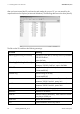

Table Of Contents
- 1 Information on this Manual
- 2 Sunny Island 4548-US/6048-US
- 3 Safety Precautions
- 4 Assembly
- 5 Opening and Closing
- 6 Electrical Connection
- 7 Control Elements
- 8 Initial Start-Up
- 9 Switching On and Off
- 10 Operation
- 11 Archiving Data on an SD Card
- 12 Additional Functions
- 12.1 Load Shedding
- 12.2 Sleep Mode
- 12.3 Time-Controlled Operation
- 12.4 Overload and Short-Circuit Behavior
- 12.5 Mixed Operation with Sunny Island inverters of Different Power
- 12.6 Device Faults and Autostart
- 12.7 Automatic Frequency Synchronization
- 12.8 Time-Controlled Standby
- 12.9 Behavior in the Event of a Failure in a Three-Phase System
- 13 Battery Management
- 14 Connecting External Sources
- 14.1 Generator
- 14.1.1 Parallel Connection
- 14.1.2 Generator Start Options
- 14.1.3 Generator Operation
- 14.1.4 Manual Generator Operation
- 14.1.5 Automatic Generator Operation
- 14.1.6 Limits and Power Control
- 14.1.7 Run Times
- 14.1.8 Operation Together with PV Inverters and Wind Power Inverters
- 14.1.9 Stopping the Generator
- 14.1.10 Stopping the Sunny Island
- 14.1.11 Disturbances
- 14.2 Grid
- 14.2.1 Limits of the Voltage Range and Frequency Range
- 14.2.2 Starting the Sunny Island
- 14.2.3 Operation in the Event of Grid Failure in a Grid-Tie Backup Configuration
- 14.2.4 Backup Operation and Anti-Islanding
- 14.2.5 Grid Reconnection
- 14.2.6 Grid Operation
- 14.2.7 Grid Failure
- 14.2.8 Disturbances
- 14.2.9 Limits and Power Control
- 14.2.10 Operation Together with PV Inverters and Wind Power Inverters
- 14.3 Generator and Grid
- 14.1 Generator
- 15 Relays
- 16 Multicluster Operation
- 16.1 Communication between the Sunny Island inverters
- 16.2 Initial Start-Up of the Multicluster System
- 16.3 Switching a Multicluster System On and Off
- 16.4 Generator Operation
- 16.5 Behavior with Different States of Charge
- 16.6 Testing the Multicluster Communication
- 16.7 Automatic Frequency Synchronization
- 16.8 Updating the Firmware
- 16.9 Error Handling in the Multicluster System
- 16.10 Grid Operation
- 16.11 Generator Emergency Operation
- 17 PV Inverters
- 18 Maintenance and Care
- 19 Parameter Lists
- 20 Troubleshooting
- 21 Accessories
- 22 Technical Data
- 23 Glossary
- 24 Contact

11 Archiving Data on an SD Card SMA America, LLC
94 SI4548_6048-US-TB_en-13 Technical description
After you have inserted the SD card into the card reader slot on your PC, you can search for the
respective drive in the Explorer (in Microsoft Windows). The following data are on this drive (here E:):
The files on the SD card have the following meanings:
File name Meaning
evthism.log (evthisN.log for SlaveN) Event history of the device, saved by means of parameter
"550.03 CardFunc",
option StoEvtHis
failhism.log (failhisN.log for SlaveN) Failure history of the device, saved by means of
parameter "550.03 CardFunc", option StoFailHis
si030607.evt Event/failure history for the day
(Format MMDDYY)
si030607.log Data recording for the day
(Format MMDDYY)
sipar1.lst Parameter list of the device, created by means of
parameter "550.01 ParaSto", option Set1
sipar2.lst Parameter list of the device, created by means of
parameter "550.01 ParaSto", option Set2
sipar.lst This file is saved after changing a parameter.
update.bin Software for the device
batstat.txt Statistical values of the battery. These values are saved
every day at 10:00 p.m.
batstat.sma Internal data from SMA
si.ccf System information from Sunny Island.