
SI4548-US-10 Manual
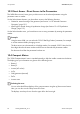

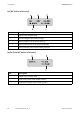


Table Of Contents
- 1 Information on this Manual
- 2 Sunny Island 4548-US/6048-US
- 3 Safety Precautions
- 4 Assembly
- 5 Opening and Closing
- 6 Electrical Connection
- 7 Control Elements
- 8 Initial Start-Up
- 9 Switching On and Off
- 10 Operation
- 11 Archiving Data on an SD Card
- 12 Additional Functions
- 12.1 Load Shedding
- 12.2 Sleep Mode
- 12.3 Time-Controlled Operation
- 12.4 Overload and Short-Circuit Behavior
- 12.5 Mixed Operation with Sunny Island inverters of Different Power
- 12.6 Device Faults and Autostart
- 12.7 Automatic Frequency Synchronization
- 12.8 Time-Controlled Standby
- 12.9 Behavior in the Event of a Failure in a Three-Phase System
- 13 Battery Management
- 14 Connecting External Sources
- 14.1 Generator
- 14.1.1 Parallel Connection
- 14.1.2 Generator Start Options
- 14.1.3 Generator Operation
- 14.1.4 Manual Generator Operation
- 14.1.5 Automatic Generator Operation
- 14.1.6 Limits and Power Control
- 14.1.7 Run Times
- 14.1.8 Operation Together with PV Inverters and Wind Power Inverters
- 14.1.9 Stopping the Generator
- 14.1.10 Stopping the Sunny Island
- 14.1.11 Disturbances
- 14.2 Grid
- 14.2.1 Limits of the Voltage Range and Frequency Range
- 14.2.2 Starting the Sunny Island
- 14.2.3 Operation in the Event of Grid Failure in a Grid-Tie Backup Configuration
- 14.2.4 Backup Operation and Anti-Islanding
- 14.2.5 Grid Reconnection
- 14.2.6 Grid Operation
- 14.2.7 Grid Failure
- 14.2.8 Disturbances
- 14.2.9 Limits and Power Control
- 14.2.10 Operation Together with PV Inverters and Wind Power Inverters
- 14.3 Generator and Grid
- 14.1 Generator
- 15 Relays
- 16 Multicluster Operation
- 16.1 Communication between the Sunny Island inverters
- 16.2 Initial Start-Up of the Multicluster System
- 16.3 Switching a Multicluster System On and Off
- 16.4 Generator Operation
- 16.5 Behavior with Different States of Charge
- 16.6 Testing the Multicluster Communication
- 16.7 Automatic Frequency Synchronization
- 16.8 Updating the Firmware
- 16.9 Error Handling in the Multicluster System
- 16.10 Grid Operation
- 16.11 Generator Emergency Operation
- 17 PV Inverters
- 18 Maintenance and Care
- 19 Parameter Lists
- 20 Troubleshooting
- 21 Accessories
- 22 Technical Data
- 23 Glossary
- 24 Contact

SMA America, LLC 10 Operation
Technical description SI4548_6048-US-TB_en-13 81
10.2 Changing Parameters
Using the up and down arrow buttons, you navigate through a selected menu to view or change a
parameter, for example. When the relevant parameter is displayed, you can read off its present value.
An arrow next to the value indicates that the parameter can be changed.
If you press <ENTER>, the arrow begins to blink and you can use the up and down arrow buttons to
change the value of the "221.02 BatCpyNom" parameter.
As soon as the desired value appears on the display, press <ENTER> to save the new value.
Then select Y(es) or N(o) by pressing the up/down arrow buttons to accept or reject the changes.
Press <ENTER> again in order to finish the process and continue with other modifications.
The Sunny Island displays a corresponding message for parameters that can only be changed in
standby mode or require a different password level.
Increments (speed)
The increment size (speed) of the change increases if you hold the button pressed down.
Changing parameters
Note that some parameters can only be changed when the device is in standby mode
(see Section 19.2 "Adjustable Parameters", page 166). All menu items that can only be
changed by the installer using a password are shaded in gray in the parameter list.
Display Description
Incorrect password level, you cannot make any
changes in the menus (see Section 10.5 "Entering the
Installer Password", page 86).
All menu items and parameters that can only be
changed by the installer are shaded in gray in the
parameter list (see Section 19 "Parameter Lists",
page 157).
This parameter can only be changed in standby
mode. Stop the Sunny Island to change the
parameter (see Section 9.2 "Stopping the Sunny
Island (Standby)", page 74).