
SI4548-US-10 Manual




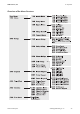
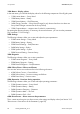
Table Of Contents
- 1 Information on this Manual
- 2 Sunny Island 4548-US/6048-US
- 3 Safety Precautions
- 4 Assembly
- 5 Opening and Closing
- 6 Electrical Connection
- 7 Control Elements
- 8 Initial Start-Up
- 9 Switching On and Off
- 10 Operation
- 11 Archiving Data on an SD Card
- 12 Additional Functions
- 12.1 Load Shedding
- 12.2 Sleep Mode
- 12.3 Time-Controlled Operation
- 12.4 Overload and Short-Circuit Behavior
- 12.5 Mixed Operation with Sunny Island inverters of Different Power
- 12.6 Device Faults and Autostart
- 12.7 Automatic Frequency Synchronization
- 12.8 Time-Controlled Standby
- 12.9 Behavior in the Event of a Failure in a Three-Phase System
- 13 Battery Management
- 14 Connecting External Sources
- 14.1 Generator
- 14.1.1 Parallel Connection
- 14.1.2 Generator Start Options
- 14.1.3 Generator Operation
- 14.1.4 Manual Generator Operation
- 14.1.5 Automatic Generator Operation
- 14.1.6 Limits and Power Control
- 14.1.7 Run Times
- 14.1.8 Operation Together with PV Inverters and Wind Power Inverters
- 14.1.9 Stopping the Generator
- 14.1.10 Stopping the Sunny Island
- 14.1.11 Disturbances
- 14.2 Grid
- 14.2.1 Limits of the Voltage Range and Frequency Range
- 14.2.2 Starting the Sunny Island
- 14.2.3 Operation in the Event of Grid Failure in a Grid-Tie Backup Configuration
- 14.2.4 Backup Operation and Anti-Islanding
- 14.2.5 Grid Reconnection
- 14.2.6 Grid Operation
- 14.2.7 Grid Failure
- 14.2.8 Disturbances
- 14.2.9 Limits and Power Control
- 14.2.10 Operation Together with PV Inverters and Wind Power Inverters
- 14.3 Generator and Grid
- 14.1 Generator
- 15 Relays
- 16 Multicluster Operation
- 16.1 Communication between the Sunny Island inverters
- 16.2 Initial Start-Up of the Multicluster System
- 16.3 Switching a Multicluster System On and Off
- 16.4 Generator Operation
- 16.5 Behavior with Different States of Charge
- 16.6 Testing the Multicluster Communication
- 16.7 Automatic Frequency Synchronization
- 16.8 Updating the Firmware
- 16.9 Error Handling in the Multicluster System
- 16.10 Grid Operation
- 16.11 Generator Emergency Operation
- 17 PV Inverters
- 18 Maintenance and Care
- 19 Parameter Lists
- 20 Troubleshooting
- 21 Accessories
- 22 Technical Data
- 23 Glossary
- 24 Contact
10 Operation SMA America, LLC
80 SI4548_6048-US-TB_en-13 Technical description
100# Meters - Display values
In this main menu, you will find the display values for the following components of the off-grid system:
• 110# Inverter Meters − Sunny Island
• 120# Battery Meters − Battery
• 130# External Meters − Grid/Generator
• 140# Charge Controller − Sunny Island Charger (is only shown when there is at least one
Sunny Island Charger connected to the Sunny Island)
• 150# Compact Meters − compact view of values for commissioning
By opening the relevant sub-menu - if necessary, the second sub-menu - you can view the parameters
(e.g. parameter "112.03 InvVtg").
200# Settings
The following sub-menus allow you to view and adjust the system parameters:
• 210# Inverter Settings − Sunny Island
• 220# Battery Settings − Battery
• 230# External Settings − Grid/Generator
• 240# Relay Settings − Relays
• 250# System Settings − System
• 280# Password Setting − Password entry
300# Diagnosis
The following sub-menus allow you to view system data:
• 310# Inverter Diagnosis − Sunny Island
• 320# Battery Diagnosis − Battery
• 330# External Diagnosis − Grid/Generator
400# Failure/Event - Failures and Events
You can view various error and event lists in the following sub-menus:
• 410# Failures Current − Current failures
• 420# Failure History − Previous warnings and failures
• 430# Event History − Previous events
500# Operation - Functions during operation
The following sub-menus allow you to view and adjust operating parameters:
• 510# Operation Inverter − Sunny Island
• 520# Operation Battery − Battery
• 540# Operation Generator − Generator
• 550# Operation MMC − SD Card
• 560# Operation Grid − Grid
600# Direct Access − Direct access to the parameters
This is a main menu that gives you direct access to the settings and display values (see Section 10.3
"Direct Access - Direct Access to the Parameters", page 82).