
SI4548-US-10 Manual




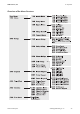
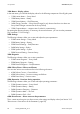
Table Of Contents
- 1 Information on this Manual
- 2 Sunny Island 4548-US/6048-US
- 3 Safety Precautions
- 4 Assembly
- 5 Opening and Closing
- 6 Electrical Connection
- 7 Control Elements
- 8 Initial Start-Up
- 9 Switching On and Off
- 10 Operation
- 11 Archiving Data on an SD Card
- 12 Additional Functions
- 12.1 Load Shedding
- 12.2 Sleep Mode
- 12.3 Time-Controlled Operation
- 12.4 Overload and Short-Circuit Behavior
- 12.5 Mixed Operation with Sunny Island inverters of Different Power
- 12.6 Device Faults and Autostart
- 12.7 Automatic Frequency Synchronization
- 12.8 Time-Controlled Standby
- 12.9 Behavior in the Event of a Failure in a Three-Phase System
- 13 Battery Management
- 14 Connecting External Sources
- 14.1 Generator
- 14.1.1 Parallel Connection
- 14.1.2 Generator Start Options
- 14.1.3 Generator Operation
- 14.1.4 Manual Generator Operation
- 14.1.5 Automatic Generator Operation
- 14.1.6 Limits and Power Control
- 14.1.7 Run Times
- 14.1.8 Operation Together with PV Inverters and Wind Power Inverters
- 14.1.9 Stopping the Generator
- 14.1.10 Stopping the Sunny Island
- 14.1.11 Disturbances
- 14.2 Grid
- 14.2.1 Limits of the Voltage Range and Frequency Range
- 14.2.2 Starting the Sunny Island
- 14.2.3 Operation in the Event of Grid Failure in a Grid-Tie Backup Configuration
- 14.2.4 Backup Operation and Anti-Islanding
- 14.2.5 Grid Reconnection
- 14.2.6 Grid Operation
- 14.2.7 Grid Failure
- 14.2.8 Disturbances
- 14.2.9 Limits and Power Control
- 14.2.10 Operation Together with PV Inverters and Wind Power Inverters
- 14.3 Generator and Grid
- 14.1 Generator
- 15 Relays
- 16 Multicluster Operation
- 16.1 Communication between the Sunny Island inverters
- 16.2 Initial Start-Up of the Multicluster System
- 16.3 Switching a Multicluster System On and Off
- 16.4 Generator Operation
- 16.5 Behavior with Different States of Charge
- 16.6 Testing the Multicluster Communication
- 16.7 Automatic Frequency Synchronization
- 16.8 Updating the Firmware
- 16.9 Error Handling in the Multicluster System
- 16.10 Grid Operation
- 16.11 Generator Emergency Operation
- 17 PV Inverters
- 18 Maintenance and Care
- 19 Parameter Lists
- 20 Troubleshooting
- 21 Accessories
- 22 Technical Data
- 23 Glossary
- 24 Contact

10 Operation SMA America, LLC
78 SI4548_6048-US-TB_en-13 Technical description
The Sunny Island utilizes an operation concept referred to as "Single Point of Operation".
For a system with more than one Sunny Island, all entries are made on the master. There, you
configure the entire system, confirm events, warnings and errors in the QCG (see Section 8 "Initial
Start-Up", page 67), and perform firmware updates when required (see Section 11.6 "Updating the
Firmware", page 99).
Exception: When starting the device for the first time, you must set the slave devices as slave in the
QCG and everything else is performed from the master.
10.1 Menu Structure
The navigation area includes the "Home Screen" and the main menu items:
• 100# Meters (display values)
• 200# Settings
• 300# Diagnosis
• 400# Failure/Event (lists)
• 500# Operation (operating functions)
• 600# Direct Access
The main menus are divided into several sub-menus.
In a sub-menu, you can select a second sub-menu or a parameter.
You can access the navigation area from one of two levels:
•User level
• Installer level (password required)
Single Point of Operation
Single Point of Operation also means that all master log data, including the slave log data,
is saved at the master device on the SD card.
Messages
Messages can be displayed at any time while the device is in operation and they have priority
over the "Home Screen" display.
Entering incorrect parameters endangers operational safety. Damage to the off-grid system and its
components.
All parameter settings which could affect the operating safety of the off-grid system are protected
by the installer password.
The menu items and parameters in which system parameters can be changed are accessible after
entering the installer password (see Section 10.5 "Entering the Installer Password", page 86).
• Only electrically qualified persons are permitted to set and adjust system parameters.