
SI4548-US-10 Manual


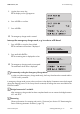





Table Of Contents
- 1 Information on this Manual
- 2 Sunny Island 4548-US/6048-US
- 3 Safety Precautions
- 4 Assembly
- 5 Opening and Closing
- 6 Electrical Connection
- 7 Control Elements
- 8 Initial Start-Up
- 9 Switching On and Off
- 10 Operation
- 11 Archiving Data on an SD Card
- 12 Additional Functions
- 12.1 Load Shedding
- 12.2 Sleep Mode
- 12.3 Time-Controlled Operation
- 12.4 Overload and Short-Circuit Behavior
- 12.5 Mixed Operation with Sunny Island inverters of Different Power
- 12.6 Device Faults and Autostart
- 12.7 Automatic Frequency Synchronization
- 12.8 Time-Controlled Standby
- 12.9 Behavior in the Event of a Failure in a Three-Phase System
- 13 Battery Management
- 14 Connecting External Sources
- 14.1 Generator
- 14.1.1 Parallel Connection
- 14.1.2 Generator Start Options
- 14.1.3 Generator Operation
- 14.1.4 Manual Generator Operation
- 14.1.5 Automatic Generator Operation
- 14.1.6 Limits and Power Control
- 14.1.7 Run Times
- 14.1.8 Operation Together with PV Inverters and Wind Power Inverters
- 14.1.9 Stopping the Generator
- 14.1.10 Stopping the Sunny Island
- 14.1.11 Disturbances
- 14.2 Grid
- 14.2.1 Limits of the Voltage Range and Frequency Range
- 14.2.2 Starting the Sunny Island
- 14.2.3 Operation in the Event of Grid Failure in a Grid-Tie Backup Configuration
- 14.2.4 Backup Operation and Anti-Islanding
- 14.2.5 Grid Reconnection
- 14.2.6 Grid Operation
- 14.2.7 Grid Failure
- 14.2.8 Disturbances
- 14.2.9 Limits and Power Control
- 14.2.10 Operation Together with PV Inverters and Wind Power Inverters
- 14.3 Generator and Grid
- 14.1 Generator
- 15 Relays
- 16 Multicluster Operation
- 16.1 Communication between the Sunny Island inverters
- 16.2 Initial Start-Up of the Multicluster System
- 16.3 Switching a Multicluster System On and Off
- 16.4 Generator Operation
- 16.5 Behavior with Different States of Charge
- 16.6 Testing the Multicluster Communication
- 16.7 Automatic Frequency Synchronization
- 16.8 Updating the Firmware
- 16.9 Error Handling in the Multicluster System
- 16.10 Grid Operation
- 16.11 Generator Emergency Operation
- 17 PV Inverters
- 18 Maintenance and Care
- 19 Parameter Lists
- 20 Troubleshooting
- 21 Accessories
- 22 Technical Data
- 23 Glossary
- 24 Contact

20 Troubleshooting SMA America, LLC
222 SI4548_6048-US-TB_en-13 Technical description
20.10 What to Do during Emergency Charge Mode
The Sunny Island cannot provide voltage with full amplitude with a deeply discharged battery and
can no longer synchronize with an existing grid or generator. Using the emergency charge mode
(ECM), it is possible to charge the batteries in current-controlled mode.
To charge the batteries in the emergency charge mode, either bridge the AC1 with AC2
(for a stationary generator) or connect a portable generator directly to AC1.
All loads must be disconnected in emergency charge mode.
Emergency charge mode is activated in the QCG. Follow the instructions on starting the QCG up to
point 2 . Then start the emergency charge mode as described in the following(see Section 8.2
"Starting the Quick Configuration Guide (QCG)", page 67)
1. Choose "Emerg Charge" in QCG with <ENTER>.
2. Confirm the following view with <ENTER>.
3. Set the maximum external current, e.g. that of the
generator.
4. Confirm the set value with <ENTER>.
Battery management
The battery management is active and the current set battery parameters and the current
charging phase are used. These values can be changed in "normal operation".
Generator and grid management
In emergency charge mode, the generator management and grid management are not active.
Reverse power protection and relay protection are also not active.
AC1 and AC2 are bridged
In case that AC1 and AC2 have been bridged the generator should be connected and then
manually started. Otherwise, it is possible that the magnetizing current trips the generator fuse.
(This can also happen when connecting the relay without using a bridge.)