
SI4548-US-10 Manual
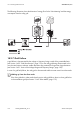
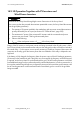
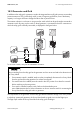
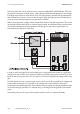
Table Of Contents
- 1 Information on this Manual
- 2 Sunny Island 4548-US/6048-US
- 3 Safety Precautions
- 4 Assembly
- 5 Opening and Closing
- 6 Electrical Connection
- 7 Control Elements
- 8 Initial Start-Up
- 9 Switching On and Off
- 10 Operation
- 11 Archiving Data on an SD Card
- 12 Additional Functions
- 12.1 Load Shedding
- 12.2 Sleep Mode
- 12.3 Time-Controlled Operation
- 12.4 Overload and Short-Circuit Behavior
- 12.5 Mixed Operation with Sunny Island inverters of Different Power
- 12.6 Device Faults and Autostart
- 12.7 Automatic Frequency Synchronization
- 12.8 Time-Controlled Standby
- 12.9 Behavior in the Event of a Failure in a Three-Phase System
- 13 Battery Management
- 14 Connecting External Sources
- 14.1 Generator
- 14.1.1 Parallel Connection
- 14.1.2 Generator Start Options
- 14.1.3 Generator Operation
- 14.1.4 Manual Generator Operation
- 14.1.5 Automatic Generator Operation
- 14.1.6 Limits and Power Control
- 14.1.7 Run Times
- 14.1.8 Operation Together with PV Inverters and Wind Power Inverters
- 14.1.9 Stopping the Generator
- 14.1.10 Stopping the Sunny Island
- 14.1.11 Disturbances
- 14.2 Grid
- 14.2.1 Limits of the Voltage Range and Frequency Range
- 14.2.2 Starting the Sunny Island
- 14.2.3 Operation in the Event of Grid Failure in a Grid-Tie Backup Configuration
- 14.2.4 Backup Operation and Anti-Islanding
- 14.2.5 Grid Reconnection
- 14.2.6 Grid Operation
- 14.2.7 Grid Failure
- 14.2.8 Disturbances
- 14.2.9 Limits and Power Control
- 14.2.10 Operation Together with PV Inverters and Wind Power Inverters
- 14.3 Generator and Grid
- 14.1 Generator
- 15 Relays
- 16 Multicluster Operation
- 16.1 Communication between the Sunny Island inverters
- 16.2 Initial Start-Up of the Multicluster System
- 16.3 Switching a Multicluster System On and Off
- 16.4 Generator Operation
- 16.5 Behavior with Different States of Charge
- 16.6 Testing the Multicluster Communication
- 16.7 Automatic Frequency Synchronization
- 16.8 Updating the Firmware
- 16.9 Error Handling in the Multicluster System
- 16.10 Grid Operation
- 16.11 Generator Emergency Operation
- 17 PV Inverters
- 18 Maintenance and Care
- 19 Parameter Lists
- 20 Troubleshooting
- 21 Accessories
- 22 Technical Data
- 23 Glossary
- 24 Contact

SMA America, LLC 14 Connecting External Sources
Technical description SI4548_6048-US-TB_en-13 137
14.3 Generator and Grid
In addition to the utility grid, a generator can also be integrated into an off-grid system as a secondary
protective measure. This is particularly useful in case of long-term grid failures, even if the battery
capacity is no longer sufficient to bridge the failure after a period of time.
The common solution in such cases is using a transfer switch which can be purchased as a manual or
automatic switch. By using such a switch, a diesel generator is connected to the AC2 connection to
which the utility grid is normally connected, as displayed in the figure below:
To use such a switch, carry out the installation as follows.
The requirements of the generator and the utility grid demand different settings of the Sunny Island.
In a backup system with generator, the Sunny Island needs a signal circuit via the DigIn input.
The DigIn input notifies the Sunny Island when the utility grid is feeding in.
Abrupt switching from the utility grid to the generator and vice versa can lead to the destruction of
the Sunny Island.
• If an automatic switch is installed, make sure that it completely disconnects the Sunny Island
from the grid and from the generator for at least five seconds.
• If a manual switch is installed, leave the switch in the OFF position for at least five seconds
before switching to the new position.
• If no switch is installed, install a switch. Refer to the download area at
www.SMA-America.com for further information on how to install a switch for connecting the
Sunny Island to the utility grid and to a generator.