
SI4548-US-10 Manual
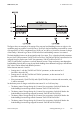
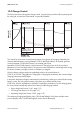
Table Of Contents
- 1 Information on this Manual
- 2 Sunny Island 4548-US/6048-US
- 3 Safety Precautions
- 4 Assembly
- 5 Opening and Closing
- 6 Electrical Connection
- 7 Control Elements
- 8 Initial Start-Up
- 9 Switching On and Off
- 10 Operation
- 11 Archiving Data on an SD Card
- 12 Additional Functions
- 12.1 Load Shedding
- 12.2 Sleep Mode
- 12.3 Time-Controlled Operation
- 12.4 Overload and Short-Circuit Behavior
- 12.5 Mixed Operation with Sunny Island inverters of Different Power
- 12.6 Device Faults and Autostart
- 12.7 Automatic Frequency Synchronization
- 12.8 Time-Controlled Standby
- 12.9 Behavior in the Event of a Failure in a Three-Phase System
- 13 Battery Management
- 14 Connecting External Sources
- 14.1 Generator
- 14.1.1 Parallel Connection
- 14.1.2 Generator Start Options
- 14.1.3 Generator Operation
- 14.1.4 Manual Generator Operation
- 14.1.5 Automatic Generator Operation
- 14.1.6 Limits and Power Control
- 14.1.7 Run Times
- 14.1.8 Operation Together with PV Inverters and Wind Power Inverters
- 14.1.9 Stopping the Generator
- 14.1.10 Stopping the Sunny Island
- 14.1.11 Disturbances
- 14.2 Grid
- 14.2.1 Limits of the Voltage Range and Frequency Range
- 14.2.2 Starting the Sunny Island
- 14.2.3 Operation in the Event of Grid Failure in a Grid-Tie Backup Configuration
- 14.2.4 Backup Operation and Anti-Islanding
- 14.2.5 Grid Reconnection
- 14.2.6 Grid Operation
- 14.2.7 Grid Failure
- 14.2.8 Disturbances
- 14.2.9 Limits and Power Control
- 14.2.10 Operation Together with PV Inverters and Wind Power Inverters
- 14.3 Generator and Grid
- 14.1 Generator
- 15 Relays
- 16 Multicluster Operation
- 16.1 Communication between the Sunny Island inverters
- 16.2 Initial Start-Up of the Multicluster System
- 16.3 Switching a Multicluster System On and Off
- 16.4 Generator Operation
- 16.5 Behavior with Different States of Charge
- 16.6 Testing the Multicluster Communication
- 16.7 Automatic Frequency Synchronization
- 16.8 Updating the Firmware
- 16.9 Error Handling in the Multicluster System
- 16.10 Grid Operation
- 16.11 Generator Emergency Operation
- 17 PV Inverters
- 18 Maintenance and Care
- 19 Parameter Lists
- 20 Troubleshooting
- 21 Accessories
- 22 Technical Data
- 23 Glossary
- 24 Contact

SMA America, LLC 12 Additional Functions
Technical description SI4548_6048-US-TB_en-13 103
The figure shows an example of the settings if the one-step load shedding function at night is to be
avoided as much as possible. From 6:00 a.m. to 10:00 p.m. the load shedding is activated for a state
of charge (SOC) of 40%, at nighttime (from 10:00 p.m. to 6:00 a.m.), however, the state of charge
of the battery is allowed to go down to 30% before the load-shedding contactor is activated.
The load shedding function can be assigned a total of two times. Thus, in the above listed parameters
the part "Lod1" (see parameter "242.01 Lod1SocTm1Str to "242.06 Lod1Tm2Str") represents the first
assigned function. Another part "Lod2" (see parameter "242.07 Lod2SocTm1Str" to
"242.12 Lod2Tm2Str") represents a second, identical function. These two battery state-dependent
load-shedding functions allow a step by step load shedding where different load groups with different
SOC values can be defined with different priorities.
Define the time intervals t1 and t2:
• Starting time t1: with the "242.05 Lod1Tm1Str" parameter, set the start time for t1
(and with it the end of t2).
• Starting time t2: with the "242.06 Lod1Tm2Str" parameter, set the start time for t2
(and with it the end of t1).
• If the time intervals t1 (Lod1Tm1Str) and t2 (Lod1Tm2Str) are consistent with one another, only
t1 will be activated.
Set the battery state of charge at which the time interval t1 or t2 will start/stop:
• The battery state of charge during the t1 interval, the recognition of which will lead to the
load-shedding function being started: Parameter "242.01 Lod1SocTm1Str"
• The battery state of charge during the t1 interval, the recognition of which will lead to the
load-shedding function being stopped: Parameter "242.02 Lod1SocTm1Stp"
• The battery state of charge during the t2 interval, the recognition of which will lead to the
load-shedding function being started: Parameter "242.03 Lod1SocTm2Str"
• The battery state of charge during the t2 interval, the recognition of which will lead to the
load-shedding function being stopped: Parameter "242.04 Lod1SocTm2Stp"