
User's Manual






Chapter 5. Error Handling
5-7
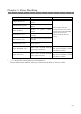
6. Press the PAPER REWIND button ①
on the operation panel.
7. After Roll Back OK? Is displayed,
press ENTER button② .
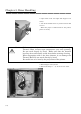
8. When Load Paper is displayed, open
the Front Cover.
9. Hold up the lever to release the lock,
and open Paper Unit.
10. Cut off the folded section or printed section
with scissors.
When the paper is folded inside of the printer,
pull it out slowly.
11. Close the Paper Load Unit,
12. Close the Front Cover.
①
②
Attention: If the paper is used without cutting off the folded section or printed
section, paper jam occurs again or the ink ribbon may snap during
printing. Always cut off the creased section or printed section of the
paper.
Cut off the paper straight and at right angles to the roll paper direction.
If paper jam occurs frequently, a defect in the mechanical section is
assumed. Consult with the service center.