
User's Manual






Chapter 5. Error Handling
5-1
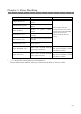
Error Message and Corrective Action
When the error happens, error message will be displayed on LCD on the operation
panel.
LCD Message Status Corrective Action
Side Cover L Open
The Side Upper Cover (Left) is
opened.
Close the Side Upper Cover
(Left).
Side Cover R Open
The Side Upper Cover (Right)
is opened.
Close the Side Upper Cover
(Right).
Upper Unit L Up
The Upper Unit (Left) is
opened.
Close the Upper Unit (Left).
Upper Unit R Up
The Upper Unit (Right) is
opened.
Close the Upper Unit
(Right).
Paper Cover Open The paper cover is opened. Close the paper cover.
Front Cover Open
The Front Cover is opened. Close the Front Cover.
Ribbon Empty L
Run out of Ink Ribbon (Left
side).
Replace the Ink Ribbon (Left
side).
Ribbon Empty R
Run out of Ink Ribbon (Right
side).
Replace the Ink Ribbon
(Right side).
Paper Empty
Run out of paper. Replace paper.
Load Paper
Run out of paper or error of
automatic load is happened.
Replace paper.
Incorrect Rib L
The ink ribbon that is set on
left side is not supported.
Ink ribbon or printer
abnormality is assumed.
Consult with the Service
Department.
Incorrect Rib R
The ink ribbon that is set on
right side is not supported.
Ink ribbon or printer
abnormality is assumed.
Consult with the Service
Center.