
Installation guide



7
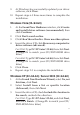
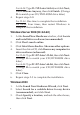
4. Insert the driver CD, type in D:\2K, then click OK.
(Change D: to match your CD/DVD-ROM drive
letter)
5. Click Next and Finish.
6. Repeat steps 1-5, then restart windows to complete
the installation.
To Verify Windows Installation
1. Use Device Manager to verify successful installation.
For Windows 7: Right click Computer, click Manage,
click Device Manager.
For Windows Vista: Right click Computer, click
Manage, click Continue, click Device Manager.
For Windows XP / Server 2003 / 2000: Right click My
Computer, click Manage, click Device Manager.
For Windows Server 2008: Right click Computer, click
Manage, double click Diagnostics, click Device
Manager.
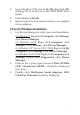
2. Click on the + (plus sign) in front of Ports (COM &
LPT), CyberSerial 16C950... should be displayed
four times.
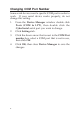
3. Double click Multi-port Serial adapters, SIIG
CyberPro 2S board should be displayed.