
Installation guide



4
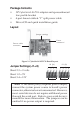
5. Carefully align the card's bus connector with the
selected PCIe slot on the motherboard. Push the
board down firmly, but gently, until it is well seated.
6. Secure the card with the slot bracket holding screw.
7. Replace the computer cover and reconnect the power
cord.
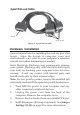
8. Connect the Mini 4-port fan-out cable to the fan-out
cable connector on the card.
Driver Installation
This section provides information on how to install the
DP CyberSerial 4S PCIe drivers.
Windows 7 (32-/64-bit)
1. Right click Computer, click Manage, click Device
Manager. Insert the driver CD.
Note: Close the CD AutoPlay box if prompted.
2. Right click PCI Device, click Update Driver
Software.
3. Click Browse my computer for driver software.
4. Type D:, then click Next. (Change D: to match your
CD/DVD-ROM drive letter)
5. At Windows has successfully updated your driver
software, click Close.
6. Under Other Devices, starting at the top, right click
16C95X Serial Port, then click Update Driver
Software.
7. Click Browse my computer for driver software.
8. Type D:, then click Next. (Change D: to match your
CD/DVD-ROM drive letter)