
Installation guide

3
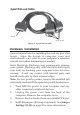
Figure 2: 4-port fanout cable
Hardware Installation
General instructions for installing the card are provided
below. Since the design of computer cases and
motherboards vary, refer to your computer’s reference
manual for further information, if needed.
Static Electricity Discharge may permanently damage
your system. Discharge any static electricity build up in
your body by touching your computer’s case for a few
seconds. Avoid any contact with internal parts and
handle cards only by their external edges.
Note: For low profile systems, remove the installed full
size bracket and install the spare low profile bracket now.
1. Turn OFF the power to your computer and any
other connected peripheral devices.
2. Unplug the power cord from the back of the
computer. Remove the computer cover.
3. Remove the slot bracket from an available PCIe slot.
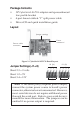
4. Set J1-J4 jumpers (this step is optional). See Jumper
Settings (J1-J4) on page 2 for more information.
Board connector
9-pin serial
4-port Fan-out Cable