
Operation Manual





7
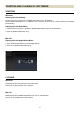
DESCRIPTION OF THE PARTS
DESCRIPTION OF THE PARTS
Windows
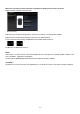
Mac OS
1. Title Bar
Software title, minimize button, and software quit button are positioned here.
2. Menu Bar
It is possible to select the setting of each function from [File] and [Help].
3. Status Window
Name of the lens presently connected to your computer, or name of a selected lens in history of connected
lens window, and connection status of USB DOCK will be shown here.
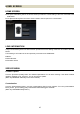
4. History of Connected Lens Window
History of lenses connected to USB DOCK will be shown here.
5.Main Window
Space for various operations. Depending on your selected function, the content displayed here will change.