
Operation Manual




20
FOCUS LIMITER SETTING
Range of the AF drive can be set (only available in lenses with a custom mode switch).
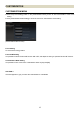
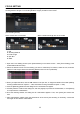
(Focus Limiter Setting Screen)
1. Shooting distance
2. Slider
1. Select the Focus Limiter Setting.
Click on [Customization] in the Home screen > [Customization Mode Setting] in the Customization Menu >
click on [C1] or [C2] in Customization Mode Setting > Click [Focus Limiter Setting] in the C1 or C2 screen.
2. Set the range of the AF drive with two sliders (the driving range of AF is highlighted in orange).
Example
Full range
10m ~ ∞
Minimum ~ 10m
10m ~ 30m
3. Click on [OK] to go back to Customization Mode Setting C1 (or C2).
4. Click the [Rewriting] button and the dialog box for confirmation will appear.
5. Carefully read the content in the dialog box, and click [Agree] to process the customization, or click [Return]
to not process the customization.
6. Once the rewriting finishes, the dialog box for confirmation appears. Then, click [Close] and remove the
lens.