
Operation Manual




19
AF SPEED SETTING
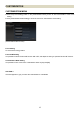
AF speed can be selected from 3 modes (only available in lenses with a custom mode switch).
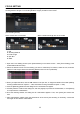
(AF Speed Setting Screen)
1. Select the AF Speed Setting.
Click on [Customization] in the Home screen > [Customization Mode Setting] in the Customization Menu >
click on [C1] or [C2] in Customization Mode Setting > Click [AF Speed Setting] in the C1 or C2 screen.
2. Select the desired mode.
Motor's drive speed-priority
Prioritize the AF speed to reach the point of focus. It can offer very fast initial speed for focusing.
Standard
Switch to default setting, which achieves both smooth operation and fast AF drive speed.
Focus accuracy-priority
Prioritize smooth focusing. It can offer very smooth operation around the point of focus.
CAUTION !!
Selectable mode depends on mounted lens.
3. Click on [OK] to go back to Customization Mode Setting C1 (or C2).
4. Click the [Rewriting] button and the dialog box for confirmation will appear.
5. Carefully read the content in the dialog box, and click [Agree] to process the customization, or click [Return]
to not process the customization.
6. Once the rewriting finishes, the dialog box for confirmation appears. Then, click [Close] and remove the
lens.
CAUTION !!
Do not remove the lens or press the detachment button while updating firmware.
Do not turn off the computer while updating firmware.
Do not customize or change the current setting of the lens while updating firmware.
In case updating firmware finishes unsuccessfully, a message [Rewriting the setting of the lens is
incomplete.] appears in the dialog box. Follow the instructions [RESET ALL CUSTOMIZATION] and proceed
resetting the customization.