
Operation Manual




18
CUSTOMIZATION MODE SETTING
For the lenses that have a customization mode switch, SIGMA Optimization Pro can offer further varieties of
customization.
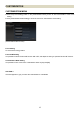
(Customization Mode Setting Screen)
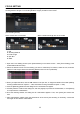
(Customization Mode Setting C1 (C2) Screen)
It is possible to save 2 sets of the customization status in [C1] and [C2].
At the flick of the Custom Mode Switch on the lens, it is possible to apply the saved setting on the lens at [C1]
and [C2].
The following are the functions offered for further customization.
AF Speed Setting
Focus Limiter Setting
OS Setting
CAUTION !!
If the text appears in gray, it means the customization is unavailable.
Customization Mode: The Sequence of Registration
The following are the steps to customize functions such as [AF Speed Setting], [Focus Limiter Setting] and [OS
Setting].
Click the [Customization] in the Home Screen.
↓
Click the [Customization Mode Setting] in the Customization Menu Screen.
↓
Select either [C1] or [C2] to save the customization in the Customization Mode Setting Screen.
↓
In the selected Customization Mode Setting, click [AF Speed Setting], [Focus Limiter Setting] or [OS Setting].
↓
Customize the lens to reflect the preference, and click [OK] once it is finished.
↓
In the selected Customization Mode Setting, click [Rewriting] to process the customization.
↓
Click [Agree] in the dialog box.
↓
Click [Close] and remove the lens once the rewriting has finished successfully.