
Operation Manual




16
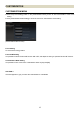
FULL-TIME MF SETTING
It is possible to select Full-time MF function ON / OFF, and adjust the timing to operate Full-time MF function.
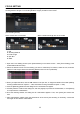
(Full-time MF Setting Screen)
Setting Full-time MF function ON / OFF
It is possible to select the Full-time MF function ON / OFF. (When the shutter button is half-pressed while auto
focusing is in operation, Full-time MF is activated by rotating the focus ring.)
CAUTION !!
There is a difference in the default setting of Full-time MF function for each mount.
Default setting of Full-time MF function
Mount
ON [Full-time MF ON]
SIGMA, NIKON, SONY
OFF [Full-time MF OFF]
CANON, PENTAX
1. Open the Full-time MF Setting Screen (Click [Customization] in the Home Screen > Click [Full-time MF
Setting] in the Customization Menu Screen).
2. To activate the function, please click the button [Full-time MF ON], or select [Full-time MF OFF] to deactivate
it.
3. Click the [Rewriting] button and the dialog box for confirmation will appear.
4. Carefully read the content in the dialog box, and click [Agree] to process the customization, or click [Return]
to not process the customization.
5. Once the rewriting finishes, the dialog box for confirmation appears. Then, click [Close] and remove the
lens.
CAUTION !!
Do not remove the lens or press the detachment button while updating firmware.
Do not turn off the computer while updating firmware.
Do not customize or change the current setting of the lens while updating firmware.
In case updating firmware finishes unsuccessfully, a message [Rewriting the setting of the lens is
incomplete.] appears in the dialog box. Follow the instructions [RESET ALL CUSTOMIZATION] and proceed
resetting the customization.