
Operation Manual




14
FOCUS SETTING
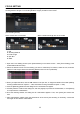
Focus can be set at each of 4 shooting distance ranges for fixed focal lenses, and each of 16 ranges (4
focusing distance ranges in x 4 shooting distance ranges) in total for zoom lenses.
(Focus Setting Screen)
When a zoom lens is connected
When a fixed focal length lens is connected
1. Cell
2. Shooting Distance
3. Focal Length
4. Spin Box
5. Slider
1. Open the Focus Setting Screen (Click [Customization] in the Home Screen > Click [Focus Setting] in the
Customization Menu Screen).
2. Select the desired cell for the focus setting you wish to customize (For instance, select the cell, as shown
below, if Focal Length 150mm and Shooting Distance around 10m is preferable).
3. When you adjust the value, click the ◄► buttons in the spin box, or drag the ▼ button of the slider (Shifting
focusing towards the front requires “
-
“ side, while back focusing orientation requires “+” side).
4. Click the [Rewriting] button and the dialog box for confirmation will appear.
5. Carefully read the content in the dialog box, and click [Agree] to process the customization, or click [Return]
to not process the customization.
6. Once the rewriting finishes, the dialog box for confirmation appears. Then, click [Close] and remove the
lens.
7. After customization, please check the performance of the lens by test shooting. If necessary, connect the
lens again to have further customization.