
Operation Manual




12
FIRMWARE UPDATE
FIRMWARE UPDATE
A firmware update can improve performance of lenses. SIGMA Optimization Pro is the multipurpose software
to satisfy photographers’ preference.
Automatic Check for the Availability of the Latest Firmware
Start up the software and connect your lens with the computer. Then, SIGMA Optimization Pro automatically
starts to check the availability of the latest firmware through the internet.
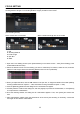
If the latest version is available, the dialog box shows [Latest firmware of the lens is available.].
For the detailed information of firmware update, click the [Detailed information]. When you start the update,
click [Yes], and when you do it later, click the [Later].
To start the update, click [Yes] and follow the instructions in the dialog box.
Manual Check for the Availability of the Latest Firmware
Click [Firmware Update] in the Home Screen. Then, SIGMA Optimization Pro starts to check the availability of
the latest firmware through the internet.
If the latest version is available, the dialog box shows [Latest firmware of the lens is available.].
For the detailed information of firmware update, click the [Detailed information]. When you start the update,
click [Yes], and when you do it later, click the [Later].
To start the update, click [Yes] and follow the instructions in the dialog box.
CAUTION !!
Do not remove the lens or press the detachment button while updating firmware.
Do not turn off the computer while updating firmware.
Do not customize or change the current setting of the lens while updating firmware.
To ensure the performance of the computer, use a fully charged battery or connect to an AC adapter while
using this software.
When the dialog box shows [Cannot connect to the server…], make sure that the computer has internet
access.
Should the firmware update not finish successfully
If the firmware update does not finish successfully, the dialog box shows [Firmware update is incomplete....].
Remove the lens and execute the recovery work as instructed in the dialog box.
Should the recovery process fail, contact your nearest Sigma authorized service station.
Memo
Click [Update Information] in the Status Window and it displays the webpage for SIGMA Optimization Pro
Download in the Sigma website. Update information for the connected lens and other lenses is available.