
Operation Manual




11
HISTORY OF CONNECTED LENS WINDOW
HISTORY OF CONNECTED LENS WINDOW
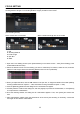
The name of those lenses that have been processed on SIGMA Optimization Pro will appear in the [History of
Connected Lens] window. (The name of the lens currently connected will appear in orange).
(History of Connected Lens window)
Memo
The information of those lenses in the [History of Connected Lens] window will be saved in the software, and
it is possible to customize those items off-line.
If you connect the same type of lens with different serial numbers and mounts, each will be listed with the
same name, but the difference will be displayed in the [Home Screen].
Deleting History
To delete the name of the lens in the “History of Connected Lens” window.
1. Click the
×
icon beside the name of the selected lens.
2. Click [Yes] to delete, or [No] to cancel in the confirmation dialog box.
CAUTION !!
It is not possible to delete the lens in orange color text from the window, as it is currently connected.
Once the name of the lens in the window is deleted, off-line customization is no longer available for the
product. It is necessary to revive the information of the lens through the internet if you wish to customize it
off-line.