
Server User Manual
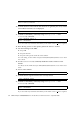
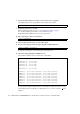

Table Of Contents
- SPARC® Enterprise M8000/M9000 Servers Product Notes
- Contents
- Preface
- General Information about XCP 1072
- Information about Hardware
- Information about Software
- XCP Issues and Workarounds
- Solaris OS Issues and Workarounds
- Software Documentation Updates
- Identifying Degraded Memory in a System
- Identifying Different Memory Sizes in a System Board
- Identifying Permanent Memory in a Target Board
- CPU Upgrade
- Installation Notes
- Adding a New CMU Equipped with SPARC64 VII as a New Domain
- Upgrading an On-CMU SPARC64 VI to SPARC64 VII, or Adding SPARC64 VII to an Existing CMU, to an Existing Domain Configured with SPARC64 VI
- Adding a New CMU Equipped with SPARC64 VII to an Existing Domain Configured with SPARC64 VI

Information about Software 41
■ Set up the CPU operational mode of the domain.
For each setting, see the SPARC Enterprise M4000/M5000/M8000/M9000 Servers XSCF
User’s Guide.
21. Power on the target domains.
22. Confirm that the target domain has been correctly started.
23. Confirm no abnormality occurred by using showlogs error -v and
showstatus(8) commands.
If you encounter any hardware abnormality of the XSCF contact a service engineer.
XSCF> poweron -d domain_id
XSCF> showlogs power
XSCF> showlogs error -v
XSCF> showstatus