
Server User Manual
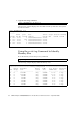
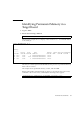
Table Of Contents
- SPARC® Enterprise M8000/M9000 Servers Product Notes
- Contents
- Preface
- General Information about XCP 1072
- Information about Hardware
- Information about Software
- XCP Issues and Workarounds
- Solaris OS Issues and Workarounds
- Software Documentation Updates
- Identifying Degraded Memory in a System
- Identifying Different Memory Sizes in a System Board
- Identifying Permanent Memory in a Target Board
- CPU Upgrade
- Installation Notes
- Adding a New CMU Equipped with SPARC64 VII as a New Domain
- Upgrading an On-CMU SPARC64 VI to SPARC64 VII, or Adding SPARC64 VII to an Existing CMU, to an Existing Domain Configured with SPARC64 VI
- Adding a New CMU Equipped with SPARC64 VII to an Existing Domain Configured with SPARC64 VI

Information about Software 31
Identifying Permanent Memory in a
Target Board
1. Log in to XSCF.
2. Execute the following command:
The following example shows a display of the showdevices -d command where 0
is the domain_id.
The entry for column 4 perm mem MB indicates the presence of permanent memory
if the value is non-zero.
The example shows permanent memory on 00-2, with 1674 MB.
If the board includes permanent memory, when you execute the deleteboard(8)
command or the moveboard(8) command, the following notice appears:
XSCF> showdevices -d domain_id
XSCF> showdevices -d 0
...
Memory:
-------
board perm base domain target deleted remaining
DID XSB mem MB mem MB address mem MB XSB mem MB mem MB
00 00-0 8192 0 0x0000000000000000 24576
00 00-2 8192 1674 0x000003c000000000 24576
00 00-3 8192 0 0x0000034000000000 24576
...
System may be temporarily suspended, proceed? [y|n]: