
Server User Manual
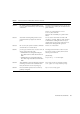
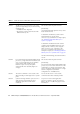
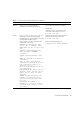
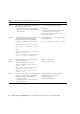
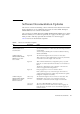
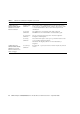
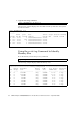
Table Of Contents
- SPARC® Enterprise M8000/M9000 Servers Product Notes
- Contents
- Preface
- General Information about XCP 1072
- Information about Hardware
- Information about Software
- XCP Issues and Workarounds
- Solaris OS Issues and Workarounds
- Software Documentation Updates
- Identifying Degraded Memory in a System
- Identifying Different Memory Sizes in a System Board
- Identifying Permanent Memory in a Target Board
- CPU Upgrade
- Installation Notes
- Adding a New CMU Equipped with SPARC64 VII as a New Domain
- Upgrading an On-CMU SPARC64 VI to SPARC64 VII, or Adding SPARC64 VII to an Existing CMU, to an Existing Domain Configured with SPARC64 VI
- Adding a New CMU Equipped with SPARC64 VII to an Existing Domain Configured with SPARC64 VI

28 SPARC Enterprise M8000/M9000 Servers Product Notes for XCP Version 1072 • September 2008
SPARC Enterprise
M4000/M5000/M8000/
M9000 Servers XSCF
Reference Manual
sendbreak(8)
command
The sendbreak(8) command will not work when the secure
mode is set to on while the mode switch on the operator panel
is set to locked. Refer to the setdomainmode(8) for more
information.
setdscp(8)
commands
The references to site planning guide of the caution in
EXAMPLES are now referenced to as administration guide.
viewaudit(8)
command
The viewaudit(8) man pages show incorrect output for
Example 5 and Example 6.
setdcl(8)
command
The action when option is set to policy and when value is set to
system will be changed as below:
Deactivates the target system for an error detected by a
diagnosis.
SPARC Enterprise
M4000/M5000/M8000/
M9000 Servers XSCF
Reference Manual and
XSCF manpages
setaudit(8)
command
By using the -t option, at most four values may be set, instead
of two.
TABLE 5 Software Documentation Updates (Continued)
Title Page Number Update