
Server User Manual
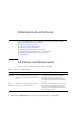
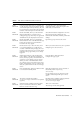
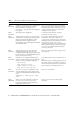
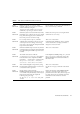
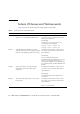
Table Of Contents
- SPARC® Enterprise M8000/M9000 Servers Product Notes
- Contents
- Preface
- General Information about XCP 1072
- Information about Hardware
- Information about Software
- XCP Issues and Workarounds
- Solaris OS Issues and Workarounds
- Software Documentation Updates
- Identifying Degraded Memory in a System
- Identifying Different Memory Sizes in a System Board
- Identifying Permanent Memory in a Target Board
- CPU Upgrade
- Installation Notes
- Adding a New CMU Equipped with SPARC64 VII as a New Domain
- Upgrading an On-CMU SPARC64 VI to SPARC64 VII, or Adding SPARC64 VII to an Existing CMU, to an Existing Domain Configured with SPARC64 VI
- Adding a New CMU Equipped with SPARC64 VII to an Existing Domain Configured with SPARC64 VI

8 SPARC Enterprise M8000/M9000 Servers Product Notes for XCP Version 1072 • September 2008
Information about Software
This section describes the special instructions and the issues about the SPARC
Enterprise M8000/M9000 servers software.
■ XCP Issues and Workarounds
■ Solaris OS Issues and Workarounds
■ Software Documentation Updates
■ Identifying Degraded Memory in a System
■ Identifying Different Memory Sizes in a System Board
■ Identifying Permanent Memory in a Target Board
■ CPU Upgrade
XCP Issues and Workarounds
TABLE 3 lists known XCP issues and possible workarounds.
TABLE 3 XCP Issues and Workarounds
ID Description Workaround
RTIF1-
070418-009
While XSCF is running, a process may go
down, a watchdog timeout may occur, or a
hang-up may occur. After this, XSCF may
reset.
Check that XSCF is started. to be translated. If
not started, stop all the domains and then
execute the system power off/on (AC
OFF/ON). To turn on the system power that
you turned off, wait at least 30 seconds before
power-on.
RTIF1-
070528-002
While XSCF is running, watchdog timeout
may occur and XSCF may reboot.
Check that XSCF is started. If not started, stop
all the domains and then execute the system
power off/on (AC OFF/ON). To turn on the
system power that you turned off, wait at least
30 seconds before power-on.