
Server User Manual
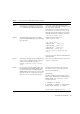
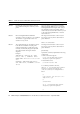
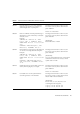
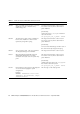
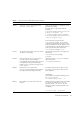
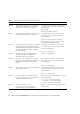
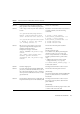
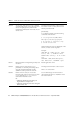
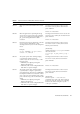
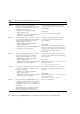
Table Of Contents
- SPARC® Enterprise M8000/M9000 Servers Product Notes
- Contents
- Preface
- General Information about XCP 1072
- Information about Hardware
- Information about Software
- XCP Issues and Workarounds
- Solaris OS Issues and Workarounds
- Software Documentation Updates
- Identifying Degraded Memory in a System
- Identifying Different Memory Sizes in a System Board
- Identifying Permanent Memory in a Target Board
- CPU Upgrade
- Installation Notes
- Adding a New CMU Equipped with SPARC64 VII as a New Domain
- Upgrading an On-CMU SPARC64 VI to SPARC64 VII, or Adding SPARC64 VII to an Existing CMU, to an Existing Domain Configured with SPARC64 VI
- Adding a New CMU Equipped with SPARC64 VII to an Existing Domain Configured with SPARC64 VI

Information about Software 17
6515648 "Replumb Failed" error appears when
dr@0:SB1::memory fails.
Once the DR operation is complete, it can be
plumbed up manually.
Example steps to re-plumb the interface
manually:
# ifconfig interface plumb xxx.xxx.xxx.xxx
netmask + broadcast + up
# ifconfig interface group group-name
# ifconfig interface addif xxx.xxx.xxx.xxx
-failover deprecated up
This workaround assumes that the
/etc/hostname.interface file is correctly
configured for the IPMP group and does not
need any modification. The IP addresses used
in the example above should match what was
previously used and what matches the
/etc/hostname.<interface> file.
6516135 Ap_Id format and devices may not be shown
correctly by cfgadm(1M).
Use the following operations to display all of
the PCI slots.
1) devfsadm (at Solaris prompt)
2) cfgadm
6519290 Large amounts of I/O on swap devices can
cause the system to appear hung by
overwhelming the I/O system. The amount of
I/O required can be generated through a
number of ways, eg memory shortage, heavy
use of /tmp etc.
Set the following to /etc/system and then
reboot the domain:
set maxfastscan=0x2000
6520990 Domain may cause a panic when
deleteboard(8) command for kernel board
by using Dynamic Reconfiguration (DR).
This bug has been fixed in Solaris 10 8/07.
For Solaris 10 11/06, this has been fixed in
patch 120011-08.
[Workaround]
To mask this error, add the following entry to
the /etc/system file.
set drmach:fmem_timeout = 30
6522017 DR and ZFS may not be used in the same
domain.
Reduce the amount of kernel memory that ZFS
can allocate by setting the zfs_arc_max
parameter in the /etc/system file. The
following example sets the maximum size to
512 Mbytes.
set zfs_arc_max = 0x20000000
TABLE 4 Solaris OS Issues and Workarounds (Continued)
CR ID Description Workaround