
Network Router User's Manual

Chapter 1: Overview
Chapter 1: Overview
This chapter provides you the description for the LEDs and connectors on the front
and rear surface of the router. Before you use/install this IAD, please take a look at
the information first.
Physical Outlook
Front Panel
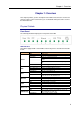
The following illustration displays the front panel of this IAD:
LED Indicators
This IAD is equipped with several LEDs on the front panel as described in the table
below:
Function Color Definition
Off Power is off.
Solid Green Power is on and the device operates normally.
Power on self-test in progress
The device enters the console mode of the boot
loader.
Solid Red
Power
Power on self-test failure if the led always stays solid
red.
Flash Red Firmware upgrades in progress
Off No DSL signal is detected.
Slow Flash Green DSL line is handshaking in progress
Fast Flash Green DSL line is training in progress
DSL
Solid Green DSL line connection is up.
Off No PPPoA or PPPoE connection
PPP
Solid Green At least one PPPoA or PPPoE connection is up. The
users can access the Internet now.
Off No Ethernet signal is detected.
Flash Green User data is going through Ethernet port
Ethernet
Solid Green Ethernet interface is ready to work.
Off No USB signal is detected.
Flash Green User data is going through USB port
USB
Solid Green USB interface is ready to work.
Off The phone is on-hook or in PSTN mode.
Phone 1 or 2
Solid Green VOIP phone call is in use.
Off Voice over IP service is not ready. The users can
make PSTN phone calls only.
VOIP Ready
Solid Green Voice over IP service is ready.
1