
User Manual




Appendix:
Printer Installation and Settings
240
---------------------------------------------------------------
15.2.2 Changing the printer settings
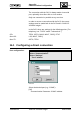
You can change the settings for your printer as follows:
At printer icon
At arrow behind "Open"
At "Settings"
➡ "Printer Name Settings" window:
At "Printer Driver" page
➡ "HP 550C Settings" window
8522OD2E
[Job Properties ...]
➡ "HP DeskJet Job Properties" window
---------------------------------------------------------------
CM2B8523E UNIGYR-VISONIK Insight March 1995