
User's Manual





6
Making the phone ready for service
Gigaset A200 / IM eng / A31008-A200-J101-2-7619 / starting.fm / 12.06.2003
Step 2: Making the handset ready for service
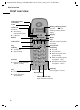
Remove protective film
Insert batteries
◆ Insert the batteries the right way round – see illustration left.
◆ Place the cover on the battery compartment about 3mm down from the latch and
push it up until it clicks into position.
To open the cover, press on the ridged section and push downwards.
i
◆ Use only the power supply unit supplied.
◆ If you buy another phone cable, ensure that it has the right connector
assignment for your country.
◆ To keep your phone operational, the power supply unit must always
remain plugged in.
The handset display is protected by a film.
Please remove the protective film!
W
◆ Insert only approved, rechargeable batteries of the same type
(page 32)! Never use normal batteries, since these could lead to a
health hazard or cause injury.
◆ Do not use a non-Siemens charging unit as this could damage the
batteries.