
User's Manual





II
Brief overview
Gigaset A200 / IM eng / A31008-A200-J101-2-7619 / cover_II.fm / 12.06.2003
Brief overview
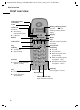
Talk key
◆ Accept call
◆ Start dialling
1 V
22-35
ÞÜ INTMENU
key
End call and
on/off key
◆ End call
◆ End function
◆ Back one menu level
(press briefly)
◆ Back to standby (press
for approx. 1 sec)
◆ Handset on/off (press
for approx. 2 secs)
Select Services key
Open network access list
Caller list
Access to
◆ Answering
machine/mail box
◆ Caller list
Star key
◆ Ringer on/off (press for
approx. 2 secs)
Battery charging status
= flat U full
flashing: battery almost
empty
Internal number
of handset
keys
Activate current functions
in display
Microphone
Display
Hash key
on/off (approx. 2 secs)
key
◆ Enquiry (Flash)
◆ Enter dial pause
(hold down)
Time
Redial
Internal list
Menu