
User's Manual





13
Making calls
Gigaset A200 / IM eng / A31008-A200-J101-2-7619 / telephony.fm / 12.06.2003
If you have stored an entry for a phone number in your handset directory (see page 14),
the name in the directory will appear instead of the phone number, e.g. "Tom".
If you do not have CLIP, "<< >>" will appear instead of the phone number.
If the caller does not have CLI or has withheld his/her phone number, "WITHHELD" will
appear in the display.
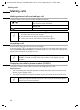
Putting on hold
During external calls you can put the incoming call on hold, so that, you can talk dis-
crectly to another person in the room for example. During this time the caller on the
phone cannot hear you (music on hold). Nor can you hear the caller.
Phone number
or name
V
023031230
MENU
CLIP Calling Line Identification Presentation = the caller's phone number is
displayed
CLI Calling Line Identification = your own phone number is passed on during
external calls.
[ _______]
INT
Press (INT ). The conversation takes place (music on
hold).
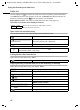
Ending call hold:
[ _______________]
MENU
Press display key to open menu.
[_____________________________________________ _] [__________]
GO BACK OK
Confirm.
i
You can also cancel the “on hold” function by briefly pressing the “replace
handset” key
a.