
User's Manual





11
Time functions
Gigaset A200 / IM eng / A31008-A200-J101-2-7619 / TimeCalendar.fm / 12.06.2003
Time functions
Set date and time
Settings for date and time are needed to ensure that these are shown correctly for
incoming calls. For the time you can choose between a 12-hour and 24-hour display
(default setting).
Date
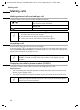
MENU ¢ BASE SET ¢ DATE/TIME ¢ DATE SET
The current setting is displayed in the format DD-MM-YY.
Time
MENU ¢ BASE SET ¢ DATE/TIME ¢ CLOCK SET
The current setting is displayed in the format HH-MM.
Display mode (24-hour or 12-hour display)
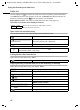
MENU ¢ BASE SET ¢ DATE/TIME ¢ CLOCK MODE
[______]
OK
Enter day/month/year and confirm.
Example: Press the keys
2 Q Q 5 Q I
for "20.05.2003".
Long press (return to idle status).
[______]
OK
Enter hours/minutes. Example: Press the keys
1O Q 5 for "19.05".
Long press (return to idle status).
i
If you want a 12-hour display you must enter Q M Q 5 for "19:05",
confirm with
OK and then confirm PM OK for the 2nd half of the day
(AM = 1st half; PM = 2nd half).
either ...
Select 12-hour display:
[__________] [______________________________________________] [__________]
12 H OK
Select and confirm.
or ...
Select 24-hour display:
[_____________________________________________ _] [__________]
24 H OK
Confirm.
Long press (return to idle status).