
User Guide


_ _ _ J_lo_/€_
• I R-904_(A) E_O 09Z007:R-904_(A) 2009-Z0-Z4 o$ Z:53 ..... :I,>....
_ SETTING THE SYSTEM j
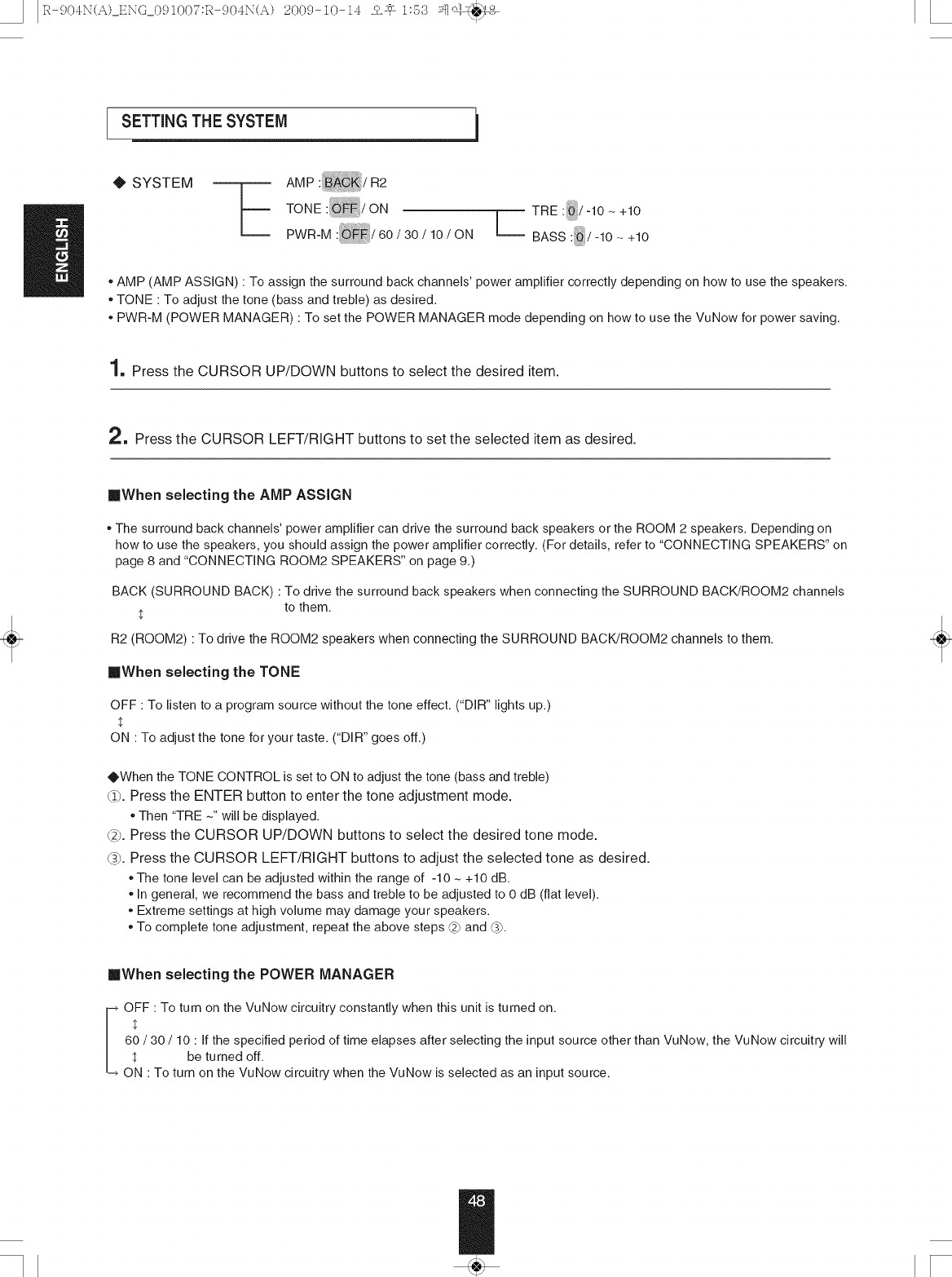
0 SYSTEM
TONE :_/ON TRE :_/-10 ~ +10
PWR-M: /60/36/16/ONL__BASS:/-16- +16
. AMP (AMP ASSIGN) • To assign the surround back channels' power amplifier correctly depending on how to use the speakers.
. TONE • To adjust the tone (bass and treble) as desired.
. PWR-M (POWER MANAGER) • To set the POWER MANAGER mode depending on how to use the VuNow for power saving.
1, Press the CURSOR UP/DOWN buttons to select the desired item.
2, Press the CURSOR LEFT/RIGHT buttons to set the selected item as desired.
mWhen selecting the AMP ASSIGN
.The surround back channels' power amplifier can drive the surround back speakers or the ROOM 2 speakers. Depending on
how to use the speakers, you should assign the power amplifier correctly. (For details, refer to "CONNECTING SPEAKERS" on
page 8 and "CONNECTING ROOM2 SPEAKERS" on page 9.)
BACK (SURROUND BACK) • To drive the surround back speakers when connecting the SURROUND BACK!ROOM2 channels
to them.
R2 (ROOM2) • To drive the ROOM2 speakers when connecting the SURROUND BACK!ROOM2 channels to them.
mWhen selecting the TONE
OFF • To listen to a program source without the tone effect. ("DIR" lights up.)
$
ON • To adjust the tone for your taste. ("DIR" goes off.)
OWhen the TONE CONTROL is set to ON to adjust the tone (bass and treble)
_1). Press the ENTER button to enter the tone adjustment mode.
* Then "TRE ~" will be displayed.
_2_.Press the CURSOR UP/DOWN buttons to select the desired tone mode.
G). Press the CURSOR LEFT/RIGHT buttons to adjust the selected tone as desired.
* The tone level can be adjusted within the range of -10 ~ +10 dB.
* In general, we recommend the bass and treble to be adjusted to 0 dB (flat level).
* Extreme settings at high volume may damage your speakers.
* To complete tone adjustment, repeat the above steps _) and _).
mWhen selecting the POWER MANAGER
%FF : To turn on the VuNow circuitry constantly when this unit is turned on.
60 / 30 / 10 : If the specified period of time elapses after selecting the input source other than VuNow, the VuNow circuitry will
$ be turned off.
ON : To turn on the VuNow circuitry when the VuNow is selected as an input source.