
User manual




Page 34
PT-7030: User Manual
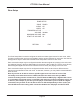
Speaker Size
The Speaker Size Menu is used to congure whether each speaker used by the PT-7030 is
considered to be “Small” or “Large”. Speakers congured as Large receive a full range audio signal,
while those congured as Small receive only frequencies above their chosen crossover frequency.
For any speaker congured as Small, frequencies below the selected crossover frequency are
routed to the shared subwoofer. (This process of diverting low frequencies from Small speakers to
the subwoofer is known as “bass management”.)
There is also an option to use the outputs normally designated as “Back Surround Speakers” to
instead provide a “height” signal. Normally, in a 7.1 surround system, there are two side surround
speakers (Surrounds) and two rear surround speakers (Back Surrounds). The Back/Height Option
allows you to re-congure the sixth and seventh channels to be “front height” channels instead of
“rear surround” channels. If you choose this option, those two channels should be connected to
an amplier that feeds speakers located in the upper front corners of your room. If you enable this
option, you will be presented with an alternate decoding option called “Dolby PLIIz”, which decodes
the correct information to be sent to these height speakers.
Note: You may also congure the PT-7030 so that, even if your Front Speakers are
congured as Large, bass from them is ALSO directed to the subwoofer. (This is similar to
what is sometimes called “Enhanced Bass” on some pre/pros.) To select this option, set
SUBWOOFER:MAX.
Note: In a typical home-theater system, with all small “satellite” speakers and a subwoofer,
the individual speakers are usually set to Small. In a system with large Front Left and Front
Right speakers, you should set FRONT:Large, and all other speakers to Small.
Large
Small
YES
None
BACK SURROUND
RETURN EXIT
SPEAKER SETUP
Small
FRONT:
CENTER:
SUBWOOFER:
SURROUND BACK:
BACK/HEIGHT:
SURROUND: