
User manual




Page 29
PT-7030: User Manual
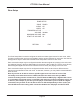
Video Setup
The Video Setup Menu is used to congure the video output resolution when a component or
composite video input is selected, to congure whether or not the PT-7030 sends audio output to
your amplier (the PT-7030 Main audio outputs), and to set CEC Control options.
Note: The Video Resolution setting in this menu only applies when an analog video source
(component or composite video) is selected. HDMI video is always passed to the output at
the same resolution in which it is received.
Note: HDMI Audio must be set to Amplier if you want the PT-7030 to decode your audio and
send it to your power amplier and speakers. If you set HDMI Audio to TV, audio will be sent
to your monitor or TV but NOT to your ampliers via the PT-7030.
Note: You may independently enable CEC Control for power only, or full CEC Control for all
functions supported by your attached device. If full CEC control doesn’t work properly with
a specic device, limiting CEC control to power only may prevent undesirable interactions
while still allowing you CEC control of basic On/Off functionality.
1080p
OFF
OFF
TO AMPLIFIER
RETURN EXIT
VIDEO SETUP
ANALOG VIDEO
RESOLUTION:
CEC POWER:
CEC CONTROL:
HDMI AUDIO: