
User manual




Page 28
PT-7030: User Manual
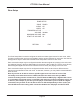
Input Setup
The Input Setup Menu is used to congure each input. For each input you can congure an Input
Name, an Input Level (level trim), an Input Title, an Audio Source, a Video Source, a Default Mode
for use when that input is selected, a list of which Triggers will be active when that input is selected,
a Lip Synch delay for use when that input is selected, and whether Cinema EQ is active when that
input is selected.
Note: When an HDMI video source is selected, choosing HDMI as your audio source will
automatically select the audio from the selected HDMI video source.
Note: When Lip Synch is set to 0mS, the lip synch delay will be automatically congured
based on HDMI parameters. Setting any other value overrides this choice and congures the
selected value manually as your chosen delay.
INPUT 1
OFF
0dB
1 2 3 4 5 6
Dolby PLII Mus
HDMI 1
HDMI
0mS
RETURN EXIT
INPUT SETUP
BLURAY
INPUT NAME:
CINEMA EQ:
INPUT LEVEL:
TRIGGERS ACTIVE:
DEFAULT MODE:
VIDEO SOURCE:
AUDIO SOURCE:
LIP SYNC:
INPUT TITLE: