
User's Manual





11N Wireless User Guide
28
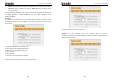
¾ AP MAC address: Input the MAC address of another (opposing) wireless router you
want to connect.
Example: This example is to bridge two W316R routers.
1. If you know the connecting router’s MAC address, please enter it into the AP MAC
address field and click “Ok”.
2. You can also search for the wireless router’s signal by scanning.
11N Wireless User Guide
29
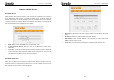
a) Click “Open scan” and click the scanned signal and click the ”Ok” button on the dialog
box and the corresponding wireless MAC address will be added to the AP MAC address
field automatically.
b) Click “Ok” after the MAC address is added.
After finishing the above steps, you need to set the other W316R router in the same way.
NOTE:
WDS feature requires both routers support this function and the SSID, channel,