
User's Manual





11N Wireless User Guide
16
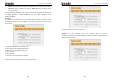
¾ Connect on Demand: Re-establish your connection to the Internet after the specific
time (Max Idle Time). Zero means you are connected to the Internet all times.
Otherwise, enter the minutes to be elapsed before you are disconnected from the
Internet.
¾ Connect Manually: Connect to the Internet by users manually.
¾ Connect on Fixed Time: Connect to the Internet during the time you fix
automatically.
NOTE:
The “Connect on Fixed Time” goes into effect only when you have set the current
time in “Time settings” from “System tools”.
Static IP
If your ISP provides you the static IP, please choose static IP, and you need to enter the IP
address, subnet mask, gateway, DNS server and alternate DNS server provided by your
ISP or network administrator。
¾ Mode: Show your current connection mode.
¾ IP address: Enter the WAN IP address provided by your ISP. If you are not clear,
please inquire your local ISP.
¾ Subnet mask: Enter the WAN Subnet Mask provided by your ISP. Generally it is
255.255.255.0。
¾ Gateway: Enter the Gateway provided by your ISP. If you are not clear, please
inquire your local ISP.
¾ DNS server: Enter the necessary DNS server provided by your ISP.
¾ Alternate DNS server: Enter the second DNS address if your ISP provides, which is
optional.
11N Wireless User Guide
17
Dynamic IP (Via DHCP)
If your connection mode is Dynamic IP, it means every time you access the Internet, you
will get a different IP. You don’t need to enter any parameters in this mode, just Click “Ok” to
finish the settings.
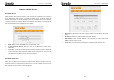
PPTP
¾ Mode: Show your current connection mode.
¾ PPTP server address: The IP address or domain name of the destination server
and it is used to specify the destination address which needs for PPTP connection.
¾ Username/Password: Used to validate identity when connecting to the PPTP
server.
¾ Address mode: Set the router’s IP address mode, you can select either “Dynamic”
or “Static”. If your ISP doesn’t provide the IP address, please select “Dynamic”.